







- Home
- All modules
- Website health
- Browser extension and desktop app
Website health
Browser extension and desktop app Beta
An instant SEO check of any page, and SEOmise on your desktop
The SEOmise extension checks any page you are on in a second, right in your browser, and shows your site's health and issues. The desktop app puts SEOmise in its own window with alerts.
Illustration of the screen, without data.
Why it matters
From the problem to what SEOmise does
Checking a page means leaving it
To see whether a page has a good title, a description, one main heading, alt text or structured data, you open a tool, paste the address and wait. And SEOmise's alerts wait in a browser tab you may have closed.
An instant SEO check of any page, and SEOmise on your desktop
- Instant on-page check. Fifteen checks on the page you are on, the same rules as SEOmise's full audit, worked out in your browser: nothing about the page is sent anywhere.
- Three ways to fix. Every finding has the steps for the page's own platform (WordPress, Shopify, Wix, Squarespace, Webflow and the rest), Help me do it in SEOmise, or Do it for me.
- Your health score and issues. On a site in your workspace the extension shows its health score, grade and the issues with the most pages, and starts a full check.
How it works
Four steps, start to finish
- Add the extensionChrome, Edge or Firefox. It asks only to read the page you are on when you click it.
- Click it on any pageTitle, description, headings, canonical, robots, language links, social tags, alt text, schema, words and links, checked in your browser.
- Sign in with a codePress Sign in, then approve the code in SEOmise. The app never sees your password.
- See your site's healthOn your own site: the health score, the open issues, Run a full SEOmise check. On any other site: Add this site to SEOmise.
Features
What you get with Browser extension and desktop app
Instant on-page check Beta
Fifteen checks on the page you are on, the same rules as SEOmise's full audit, worked out in your browser: nothing about the page is sent anywhere. Ask for early access while the store listings are approved.
Three ways to fix
Every finding has the steps for the page's own platform (WordPress, Shopify, Wix, Squarespace, Webflow and the rest), Help me do it in SEOmise, or Do it for me.
Your health score and issues
On a site in your workspace the extension shows its health score, grade and the issues with the most pages, and starts a full check.
Add this site
One click opens SEOmise's set-up with the address filled in.
Figures on Google results
Off until you switch it on: SEOmise's figures next to results for your own sites and competitors, matched in your browser. Nothing is scraped.
Desktop app Beta
SEOmise in its own window on Windows, macOS and Linux, with a tray icon, start at sign-in and seomise:// links. Ask for early access while the signed installers are published.
Desktop alerts, on by default
Your SEOmise notifications as desktop notifications on Mac, Windows and Linux, checked once a minute. Once you are signed in to SEOmise in the app, it opens the approval by itself: one click and they are on. The tray shows whether they are on, waiting or blocked, with the button to fix it.
Alerts in your browser
The extension shows the same alerts as Chrome, Edge or Firefox notifications, on by default once you sign in; a click opens the alert in SEOmise. Switch them off in its Options.
Private and locked down
No tracking. The extension asks for Google access only if you switch the overlay on. The desktop app opens only your SEOmise and sends other links to your browser.
Before and after
What changes with Browser extension and desktop app
Before: without the apps. After: with the SEOmise apps. Drag the handle, or use the arrow keys, to compare.
Without the apps
- Paste addresses into a tool to check a page
- Look up whether a site is yours in another tab
- Alerts sit in a tab you closed
With the SEOmise apps
- One click checks the page you are on
- Your health score and issues where you are
- Alerts on your desktop and in your browser
Illustration of the difference, not a measured result.
What it needs
No surprises after you sign up
Turn a card over for the detail.
A SEOmise account for the signed-in parts
A SEOmise account for the signed-in parts
The on-page check works without one; your health score, issues, full checks and alerts need you signed in.
Every platform
Whatever your site runs on
What Browser extension and desktop app does on each kind of website, from SEOmise's site connectors to step-by-step guidance.
WordPress
WordPress and WooCommerceThe check reads any page; the fix steps name your SEO plugin.
Laravel
Sites built on LaravelThe check reads any page; the fix steps name your templates.
Any PHP site
Custom PHP, CodeIgniter, Symfony, Drupal, JoomlaThe check reads any page; the fix steps name your templates.
Every other platform
Shopify, Wix, Squarespace, Webflow, static sites and the restShopify, Wix, Squarespace, Webflow, Ghost and every other platform: the fix steps say where to make each change on it.
Browser extension and desktop app is in beta
It is not on sale yet, so there are no prices for it. Leave your name and e-mail address and we will tell you as soon as you can use it.
Questions about it?
Ask Mise, our assistant, in the help centre, or book a call and we will tell you where Browser extension and desktop app stands and what you can use today.
Questions
Browser extension and desktop app: common questions
Does the extension see my password?
No. You press Sign in, the extension shows a code, and you approve it in SEOmise where you are already signed in. You can remove the extension's access in Apps & devices at any time.
What does it send to SEOmise?
The on-page check sends nothing. Signed in, it asks SEOmise for your own sites and their figures, and matches the page you are on in your browser, so the addresses you visit are not sent.
Does it read Google?
Only if you switch on the overlay, and only the result page you are looking at. It never runs searches or opens other pages.
Which browsers and computers?
Chrome, Microsoft Edge and Firefox; the desktop app on Windows 10 and 11, macOS 10.15 and later, and Linux (AppImage and .deb).
Are notifications on?
Yes, by default in both apps. Your computer may ask you once to allow them (macOS does). The extension keeps showing them after the browser restarts when you tick "Stay signed in" in its Options.
Can I use my own SEOmise server?
Yes: both apps let you change the SEOmise address for a self-hosted or regional SEOmise.
Can I use Browser extension and desktop app now?
Browser extension and desktop app is in beta: it is not on sale yet. Use Ask for early access and we will e-mail you as soon as it is ready for you. Other modules and the plans are on the pricing page.
Works well with
Related modules
-
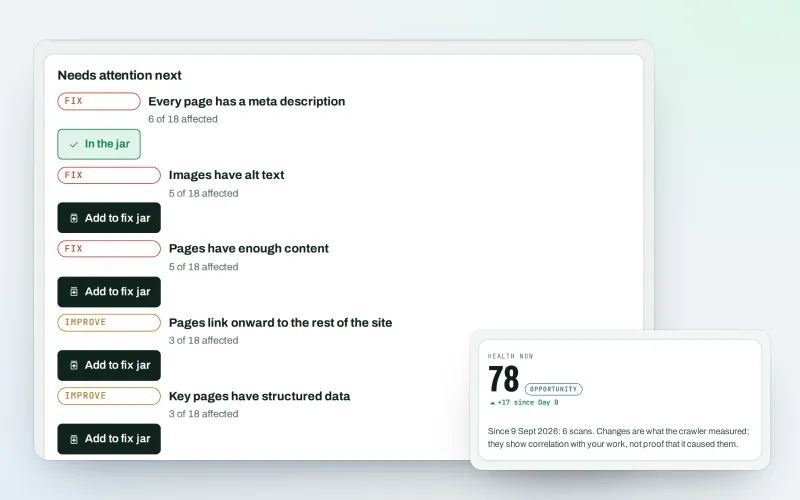
Website health check
A technical SEO audit: see what is wrong with your website, and what to fix first
Explore -
Free site audit (100 pages)
A free website audit of up to 100 pages of any site, without an account
Explore -
Apps & plugins
The connector for your site's platform and SEOmise on your browser, computer and phone
Explore -
Phone and browser notifications
SEO push notifications: know the moment something needs you, on phone or computer
Explore -
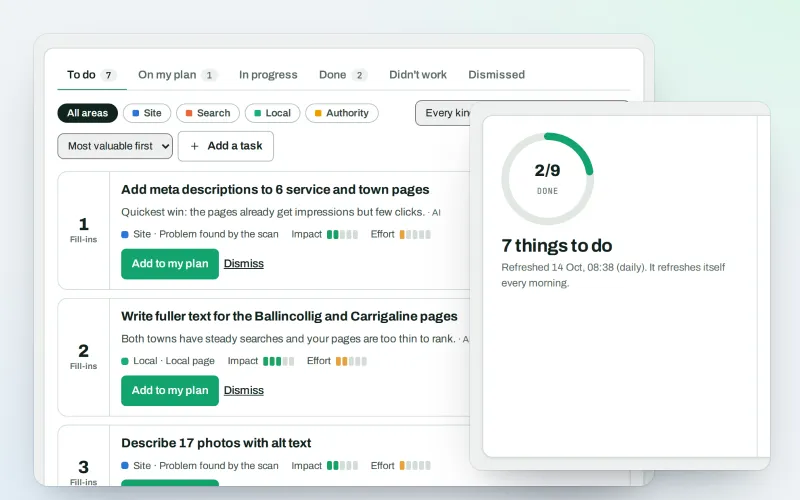
AI Plan
Your SEO action plan: the biggest difference for the least work first
Explore -
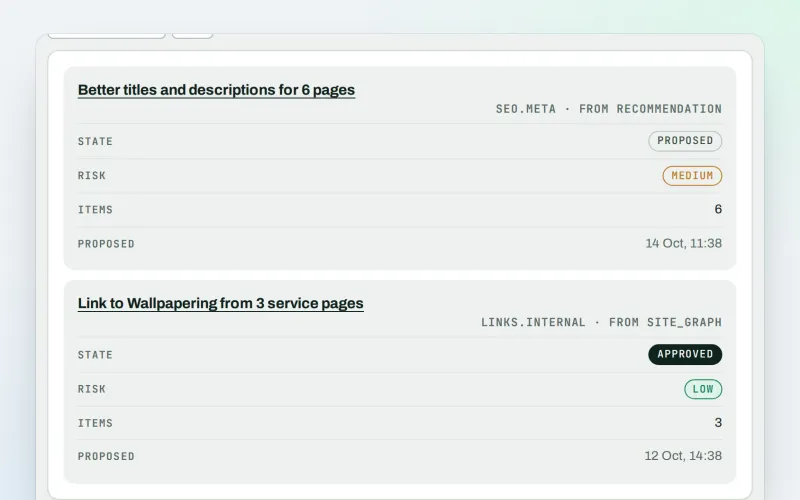
Approve and publish
Approve a fix once, and publish SEO changes that are checked and can be undone
Explore -
CDN and edge Beta
A CDN checker: see how your CDN serves your website, with changes you approve
Explore -
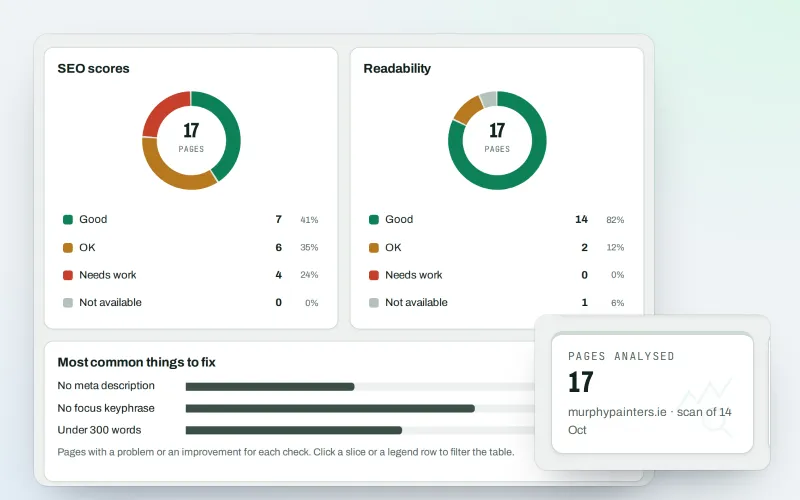
Content SEO checks
A content SEO checker for your titles, keyphrases and readability
Explore
Be among the first to try Browser extension and desktop app
Browser extension and desktop app is in beta. Ask for early access and we will e-mail you when it is ready for you; nothing is bought.
No ranking guarantees: just clear work, with the evidence.
