

- Home
- All modules
- Agencies & developers
- Agency tools
Agencies & developers
Agency tools
SEO agency software: win clients, work under your brand, give each client a portal
SEO agency software with a lead audit widget for your website, white label with your own domain and e-mail, and a portal where each client sees only their own projects.

A screen from the SEOmise demo, with sample data.
Why it matters
From the problem to what SEOmise does
Client work spread over too many places
Reports and e-mails carry another company's name. Logins, approvals and invoices arrive in separate e-mail threads. And giving a client a look at their own site should never show them anyone else's.
SEO agency software: win clients, work under your brand, give each client a portal
- Lead audit widget. A short form for your website. It checks up to 10 pages of the visitor's site and e-mails them a short report in your brand.
- Leads you can act on. Each lead shows the website, its score and the details the visitor agreed to share. Turn a lead into a project and invite them in one step.
- White label. Your name, logo, icon and colours in the app, on reports, in the portal and in the e-mails your customers get.
How it works
Four steps, start to finish
- Add your clientsGroup each client's projects and choose the people in your team who look after them.
- Set up your brandAdd your name, logo, colours and sender details. With white label, the app, reports and customer e-mails carry your brand.
- Use your own addressAdd a host name such as reports.youragency.com and two DNS records. Once it is verified, client sign-in, reports and widgets open there.
- Open the customer portalSwitch the portal on for a client. Their people choose their own password and only ever see their own projects.
Features
What you get with Agency tools
Lead audit widget
A short form for your website. It checks up to 10 pages of the visitor's site and e-mails them a short report in your brand.
Leads you can act on
Each lead shows the website, its score and the details the visitor agreed to share. Turn a lead into a project and invite them in one step.
White label
Your name, logo, icon and colours in the app, on reports, in the portal and in the e-mails your customers get.
Your own e-mail sending
Send customer e-mail through your own SMTP server, Brevo or Google account. Until a test goes through, we send it for you.
Sending routes
Choose per type of message whether it goes through us, your own e-mail sending or your own Microsoft 365 mailbox, so reports come from your own inbox. If your account cannot send, hold the message and hear about it, or let us send it with your name.
Design studio
Make your own versions of the messages your customers receive, your e-mail layout and your report template.
Client-level access
Client users only see the projects in their client group. Removing someone from their last group never widens what they see.
Share a project, like Figma
Invite people by e-mail, or turn on "Anyone with the link" to view or edit. Viewers are free; editors take a seat, added only once an owner agrees to its price.
Customer portal
Clients see how each website is doing, what was done lately, and what is waiting on them: requests, approvals and invoices.
Help desk and requests
Tickets from your clients come to you first. Ask clients for access, approvals or content with a due date, and they get reminders.
Invoices through your Stripe
Bill clients one-off or with a monthly or yearly retainer through your own Stripe account, connected with Stripe Connect. Payments go straight to you. SEOmise takes a commission of 10% of each payment you collect from your clients (tax not included), for agencies joining from 26 October 2026; agencies already billing get 30 days' notice.
Before and after
What changes with Agency tools
Before: without agency tools. After: with agency tools. Drag the handle, or use the arrow keys, to compare.
Without agency tools
- Reports and e-mails show another company's name
- Passwords and approvals arrive in scattered e-mails
- Clients ask you by e-mail how their site is doing
With agency tools
- The app, reports and customer e-mails carry your brand
- Requests have due dates, reminders and a secure way to send a password
- Clients see progress and what waits on them in their own portal
Illustration of the difference, not a measured result.
What it needs
No surprises after you sign up
Turn a card over for the detail.
White label
White label
For your brand, your own domain, your own e-mail sending and the design studio. It is part of some plans and can also be an add-on.
Website checks in your plan
Website checks in your plan
The lead widget uses a monthly number of checks from your plan. Scans use Website health, so it needs to be in your plan too.
Access to your DNS
Access to your DNS
Only for your own domain: a CNAME record and a TXT record at your DNS provider.
Your own Stripe account
Your own Stripe account
Only for invoicing clients. Connect it with Stripe Connect in a few clicks; clients who pay another way (bank transfer, PayPal and others) can be recorded instead.
Every platform
Whatever your site runs on
What Agency tools does on each kind of website, from SEOmise's site connectors to step-by-step guidance.
WordPress
WordPress and WooCommercePaste the widget code where your site accepts HTML, or link to the widget's own page. No plugin needed.
Laravel
Sites built on LaravelAdd the widget code to a Blade view, or link to the widget's own page.
Any PHP site
Custom PHP, CodeIgniter, Symfony, Drupal, JoomlaAdd the widget code to any page, or link to the widget's own page.
Every other platform
Shopify, Wix, Squarespace, Webflow, static sites and the restAny other site that accepts HTML, including site builders, or a link to the widget's own page. The portal and branding do not depend on your site.
Where Agency tools is included
Included in this plan. Limits, such as pages per scan or credits a month, are on the pricing page.
See pricingNot sure it fits?
Ask Mise, our assistant, in the help centre, or book a call and we will show you Agency tools on a site like yours.
Questions
Agency tools: common questions
What do my clients see with white label?
The app, reports, the portal, the widget pages and the e-mails your customers get carry your name, logo and colours. Mail about your own SEOmise plan is not rebranded.
Can a client see other clients' projects?
No. A client user only sees the projects in their own client group, and any other project stays closed to them. If you remove them from their last group, they see no projects until you give them full access.
How does the widget keep out spam?
It only runs on the websites you list. It uses a hidden trap field, a timing check, checks on the e-mail address, limits per visitor, website and address, and a bot check when one is set up.
Does the widget score predict rankings?
No. It measures what our crawler could see on up to 10 pages of the site. It is not a prediction of search rankings.
How do I get paid by my clients?
Connect your Stripe account under Agency, Billing. Send one-off invoices or set up a monthly or yearly retainer. Clients pay on Stripe's invoice page and the money goes straight to you.
Can I pause a client's invoicing for a while?
Yes. Pause on a client's billing stops the invoices of their plan without ending it. Choose whether the invoices of the paused period are voided (the default), kept as drafts or marked uncollectible, and, if you like, the day invoicing starts again by itself. Resume starts it again at any time.
Does SEOmise take a share of what my clients pay?
SEOmise takes a commission of 10% of each payment you collect from your clients (tax not included), for agencies joining from 26 October 2026; agencies already billing get 30 days' notice. With Stripe Connect it is taken with each payment; for payments made another way it is on a monthly statement. Your clients never see it.
What happens to lead data?
Contact details are stored encrypted and deleted automatically after the number of days you choose. You can export or delete one lead, or delete every lead for an e-mail address when someone asks.
Which plans include Agency tools?
Agency tools is included in the Agency plan. Prices and limits are on the pricing page.
Works well with
Related modules
-
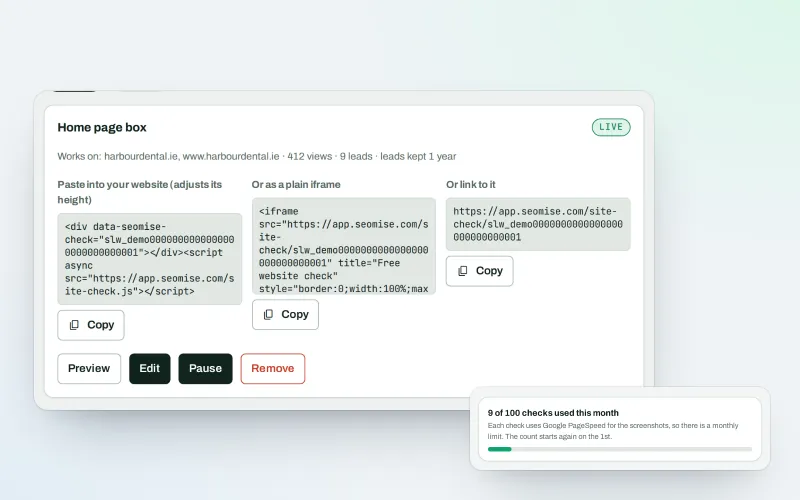
Website-check lead box Beta
An SEO lead generation widget: turn website visitors into leads with a free check
Explore -
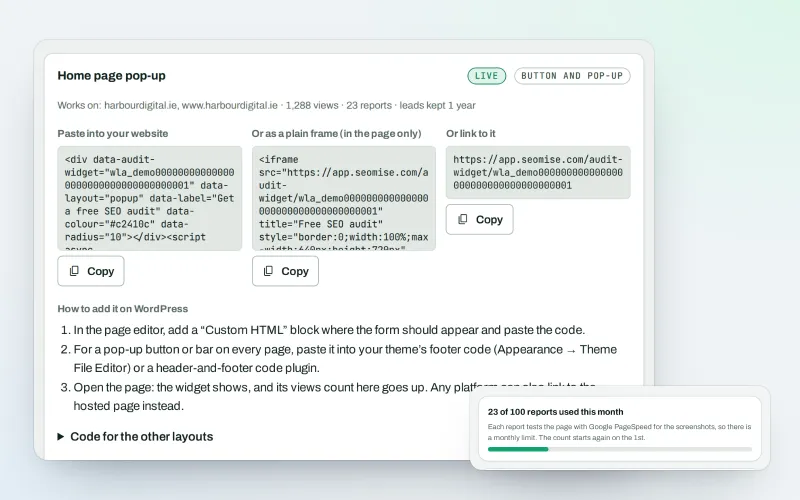
White-label audit widget Beta
A free SEO audit on your website that wins you clients
Explore -
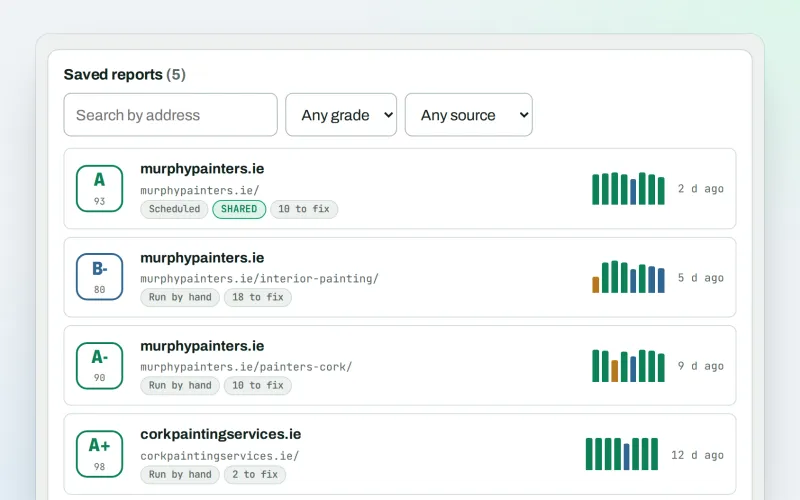
SEO audit reports
A graded SEO audit of any web address, ready to share or send
Explore -
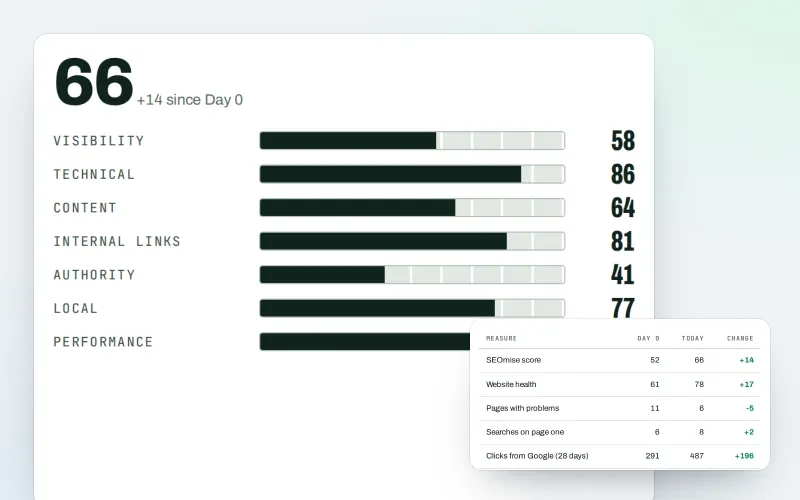
Client reports
White label SEO reports as a PDF, e-mailed every week or month
Explore -
Live client report links
Live SEO reports: send clients one private link that is always up to date
Explore -
Developer API
Use your SEO data in your own systems, dashboards and websites
Explore -
Expert help Beta
Hire an SEO expert from our team: a consultation, a task, a retainer or a website
Explore -
Agency catalogue Beta
An SEO agency directory listing that brings businesses to you
Explore
Partner with SEOmise Beta
Agencies, resellers, regional companies and creators: offer SEOmise to your clients with a wholesale discount off the list price, or earn a share recommending it.
Try Agency tools on your own site
Add your site; your first scan becomes your Day 0 baseline. Nothing is bought or published without your approval.
No ranking guarantees: just clear work, with the evidence.
