

- Home
- All modules
- Visitors & reports
- Live view
Visitors & reports
Live view
See real-time website visitors, right now, and where they click
Watch real-time website visitors move through your pages: where they came from, how far they scroll, what they click and where they give up. No cookies.

A screen from the SEOmise demo, with sample data.
Why it matters
From the problem to what SEOmise does
You cannot see what visitors do
Totals tell you how many people came, not what they did on the page. You cannot tell whether they saw your offer, clicked something that does nothing, or left before the contact form.
See real-time website visitors, right now, and where they click
- Who is on the site now. Each visitor drawn on the real page, with the page they are on and how far down they are. Clicks show as they happen.
- Visitor details. Approximate location, device, browser, where they came from (search, social, another site or a campaign) and every page they opened, with time and scroll depth.
- Click and mouse heat maps. Where people click on each page and, on computers, where the mouse goes. Pick the period and the screen size.
How it works
Four steps, start to finish
- Add the trackerThe WordPress, Laravel and PHP connectors add it for you. On any other site, paste one line of code before </head>.
- Check it worksCheck installation loads your home page, looks for the tracker and tells you if a page optimiser is holding it back.
- Watch visitors arriveVisitors appear within seconds, on a copy of your own page, with how far they have scrolled.
- Learn and fixHeat maps, page walks and a list of what visitors struggle with show you what to change first.
Features
What you get with Live view
Who is on the site now
Each visitor drawn on the real page, with the page they are on and how far down they are. Clicks show as they happen.
Visitor details
Approximate location, device, browser, where they came from (search, social, another site or a campaign) and every page they opened, with time and scroll depth.
Click and mouse heat maps
Where people click on each page and, on computers, where the mouse goes. Pick the period and the screen size.
Scroll depth
How far down each page people read, so you know whether they reach your offer or your form.
How people move through the site
Insights shows the most common page walks, the moves from page to page, and the pages where visits start and end.
Visitor statistics
Visits and page views, devices, browsers, screen sizes, languages, countries and cities, sources, UTM campaigns and the hours people visit.
What visitors struggle with
Rage clicks, clicks on things that do nothing, quick exits, pages nobody scrolls, slow pages and a gap between phones and computers, each with its numbers and a fix.
Explain with AI
Turns those findings into a short summary and the fixes worth doing first, in plain words. It uses only the numbers measured and one AI credit.
90 days, 1 GB, reports kept
Each site keeps 90 days of visits within 1 GB, the oldest going first when it is full. The daily figures stay in your traffic reports, and you can add storage by the GB.
Works on every platform
Live view keeps a cleaned picture of each page to draw on, so it works even where your site cannot be shown inside another page, and says why when it cannot. Single-page sites are counted page by page.
Before and after
What changes with Live view
Before: guessing. After: seeing. Drag the handle, or use the arrow keys, to compare.
Guessing
- You know how many people came, not what they did
- You cannot tell if anyone reaches your form
- Broken buttons and slow pages go unnoticed
Seeing
- Visitors on your real pages as it happens
- Heat maps and scroll depth for every page
- A list of what visitors struggle with, and a fix for each
Illustration of the difference, not a measured result.
What it needs
No surprises after you sign up
Turn a card over for the detail.
The tracker on your pages
The tracker on your pages
Added by the WordPress, Laravel or PHP connector, or one line you paste into your site. Nothing else is installed.
Live view switched on for the site
Live view switched on for the site
It is on by default. Switch it off in Live view settings and the tracker records nothing.
A line in your privacy notice
A line in your privacy notice
You decide what is recorded on your site, so say so in your privacy notice and ask for consent where your cookie banner requires it.
AI credits (optional)
AI credits (optional)
Only for Explain with AI. Everything else works without them.
Every platform
Whatever your site runs on
What Live view does on each kind of website, from SEOmise's site connectors to step-by-step guidance.
WordPress
WordPress and WooCommerceThe WordPress connector adds the tracker by itself. People signed in to WordPress are not counted.
Laravel
Sites built on LaravelThe Laravel connector adds the tracker to every page. Signed-in users are not counted unless you choose to count them.
Any PHP site
Custom PHP, CodeIgniter, Symfony, Drupal, JoomlaInclude the PHP connector file at the top of your pages and it adds the tracker for you.
Every other platform
Shopify, Wix, Squarespace, Webflow, static sites and the restShopify, Wix, Squarespace, Webflow, static sites and others: paste one line before </head> or add it with Google Tag Manager, then press Check installation.
Where Live view is included
Included in these plans. Limits, such as pages per scan or credits a month, are on the pricing page.
See pricingNot sure it fits?
Ask Mise, our assistant, in the help centre, or book a call and we will show you Live view on a site like yours.
Questions
Live view: common questions
Does Live view use cookies?
No. The tracker sets no cookies. It keeps a random visit id in the browser tab's session storage, which the browser clears when the tab closes. If you switch on "Recognise returning visitors", it also keeps a random id in the visitor's browser for your site only. That setting is off by default and needs consent in the EU and the UK.
What about IP addresses?
By default, Live view stores the visitor's IP address and uses it to look up an approximate location. Switch on "Shorten IP addresses" and the last part is set to zero before it is stored (192.0.2.0 instead of 192.0.2.17).
Is anything private recorded?
What people type is never recorded. Clicks on form fields keep no label. Query parameters that look personal (e-mail, phone, name, token and similar) are dropped from page addresses. Page copies leave out scripts and form values, blank e-mail addresses and long numbers, and pages with password or card fields are never copied.
Does it respect visitors who say no?
Yes. It does not run in browsers that send Do Not Track or Global Privacy Control. Where the WordPress Consent API is used, it runs only after the visitor allows statistics. Any consent tool can stop it by setting window.seomiseConsent to false.
How long are visits kept?
90 days by default (you can choose 7, 14, 30 or 60 days instead), within 1 GB of storage per site. If a busy site fills its storage sooner, the oldest visits are removed first. Your traffic reports keep their daily figures for good, so a 12-month report still shows the old months. You can also delete every recorded visit for a site at once.
Can I keep more?
Yes. Owners and admins press Add storage in Live view settings and choose how many GB, at €2 a GB a month unless the price shown there says otherwise. On a card subscription it is added at once and billed monthly; otherwise our team adds it on request.
My site is busy. Can I record less?
Yes. You can record every visit or a share of them (50%, 25% or 10%), and switch clicks, mouse movement, scroll depth and single-page navigation on or off one by one.
Which plans include Live view?
Live view is included in the Business and Agency plans. Prices and limits are on the pricing page.
Works well with
Related modules
-
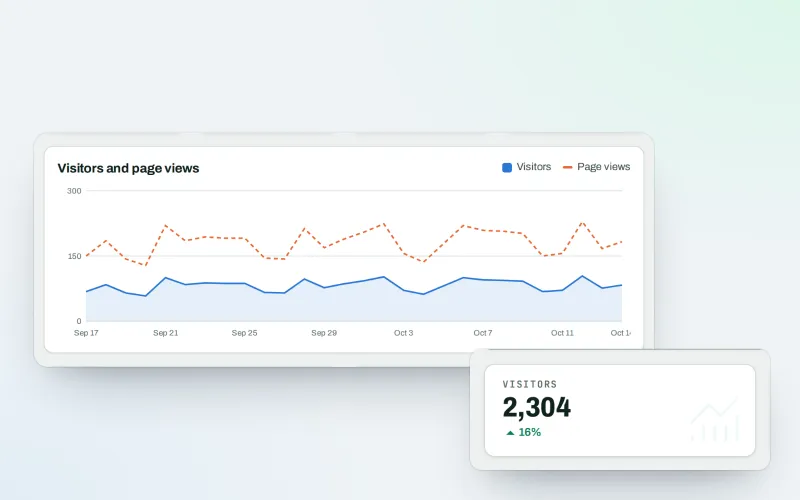
Traffic statistics
Cookie-free analytics: visitor statistics counted on your own website
Explore -
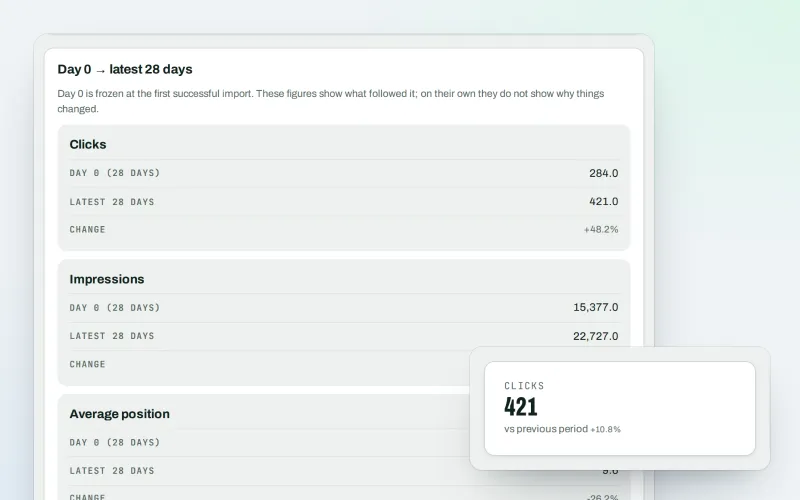
Google data
A Search Console dashboard with your Analytics figures, imported every day
Explore -
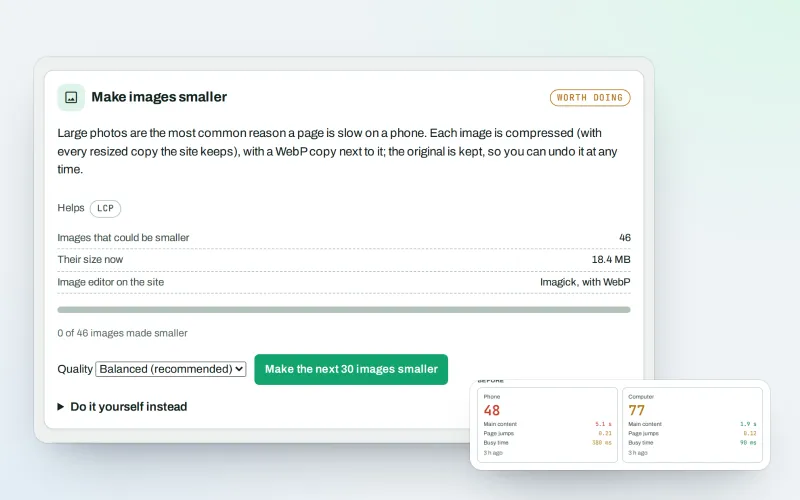
Speed fixes Beta
Website speed optimisation: find what slows your site down and fix it, safely
Explore -
Lead capture Beta
Forms, pop-ups and call buttons on your site that fill your Lead inbox
Explore -
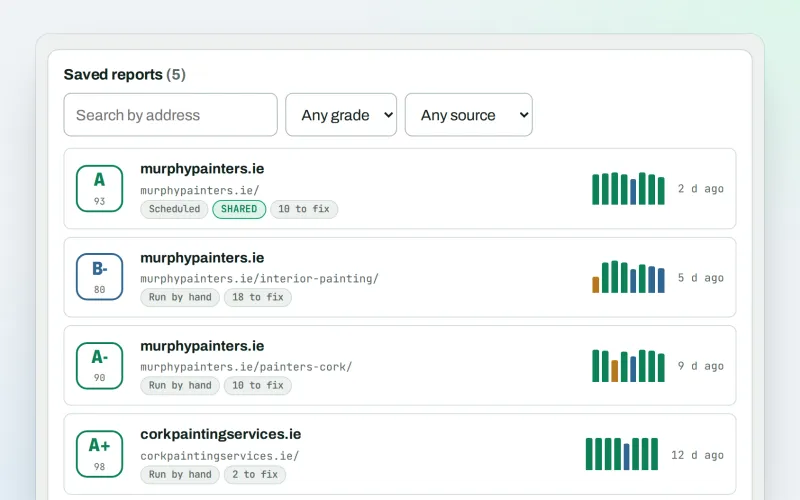
SEO audit reports
A graded SEO audit of any web address, ready to share or send
Explore -
Live client report links
Live SEO reports: send clients one private link that is always up to date
Explore -
Client update e-mails
Client SEO updates by e-mail: rankings up, rankings down and the work done
Explore -
Proof of Progress
An SEO progress report: show a client what changed since the work started
Explore
Try Live view on your own site
Add your site; your first scan becomes your Day 0 baseline. Nothing is bought or published without your approval.
No ranking guarantees: just clear work, with the evidence.
