

- Home
- All modules
- Website health
- Approve and publish
Website health
Approve and publish
Approve a fix once, and publish SEO changes that are checked and can be undone
Every change SEOmise suggests waits for your approval. Then it publishes the SEO changes to your site through the connector, checks them on the live page and can undo them.

A screen from the SEOmise demo, with sample data.
Why it matters
From the problem to what SEOmise does
Letting a tool change your site
You want to know exactly what will change, who said yes, and how to put it back if something looks wrong. Making the same fixes by hand, page by page, is slow and easy to get wrong.
Approve a fix once, and publish SEO changes that are checked and can be undone
- Before and after. Each change shows the old and new value of every field side by side, so you approve exactly what you see.
- Approval by role. Owners and admins can approve anything. Approvers approve everyday changes, SEO managers publish, and content editors can propose but not approve.
- Do it for me. On a connected site, the tools fix an item in one press: the change is prepared, approved when your role may, sent to your site and checked, step by step in a window, with Undo and a new scan at the end.
How it works
Five steps, start to finish
- See exactly what changesEvery proposed change lists the pages it touches, with the current value, read from your site through the connector, beside the new one. New pages get a full preview.
- A person approves itNothing reaches your site until someone with the right role approves it. Large changes, changes that hide content and new pages need an owner or admin.
- It is sent, signedSEOmise sends the change to your site connector as a signed command. The connector checks the signature and the permissions you gave before applying it.
- It is checked on the live pageThe connector reads the change back, and SEOmise opens the public page to confirm it is there. If a page cache hides it, SEOmise checks again about 15 minutes later.
- Undo whenever you likeRoll back a whole change and your site goes back to how it was. Where your connector supports it, undo single pages or images instead.
Features
What you get with Approve and publish
Before and after
Each change shows the old and new value of every field side by side, so you approve exactly what you see.
Approval by role
Owners and admins can approve anything. Approvers approve everyday changes, SEO managers publish, and content editors can propose but not approve.
Do it for me
On a connected site, the tools fix an item in one press: the change is prepared, approved when your role may, sent to your site and checked, step by step in a window, with Undo and a new scan at the end.
High-risk changes flagged
Bulk changes, new pages, and changes that hide pages from search or remove links are among those marked high risk. They need an owner or admin.
Signed and limited
Commands are signed and can only do what the site owner allowed in the connector settings. Each command is applied once, even if it is sent again.
Checks on the live page
SEOmise looks for the new title, description, canonical, robots tag, structured data, links or text on the public page, and about an hour later checks the change is still there.
Automatic rollback
If your site did not keep a change, or the page still does not show it after the second check, SEOmise puts it back and e-mails the person who asked for it and the approver.
A full record
Who proposed, approved and published each change, every command sent and every check result, kept in the change's history and the project timeline.
Connect over SSH Beta
Laravel, PHP and WordPress sites can also be connected from the Connect step, or Settings → Connect your website → Site connector, over SSH: SEOmise signs in to your server for that session only, uploads the connector made for your site and runs its fixed commands, each shown before you press Run. Safest: a key SEOmise makes for your site. You add its public half in your host panel (cPanel, Plesk or any server), so no password or private key leaves your computer, and SEOmise deletes the key once the site is connected. A password or a key of your own is never kept. In early access: ask for it on the Connect step of your project.
Send to my developer
Someone else looks after your website? On the Connect step, or the Install guide, enter their e-mail address or copy a private link. They open a page without an account with exactly the steps for your platform (WordPress, Laravel, PHP or the one line of code on Shopify, Wix and the rest): the download made for your website, the lines to add, the commands to check it and the pairing code. You see when they opened it and when the site connected; the link expires after 7 days by default, you can revoke it, and it stops once the site is connected.
One queue for every tool
Fixes from the health check, Content SEO, the AI Plan, Speed fixes, Accessibility and the 404 fixer all arrive in the same Changes list.
Before and after
What changes with Approve and publish
Before: fixing by hand. After: with Approve and publish. Drag the handle, or use the arrow keys, to compare.
Fixing by hand
- Copy each new title into each page yourself
- No record of who changed what, or when
- Putting a change back means remembering how it was
With Approve and publish
- Approve once and every page in the change is updated
- Every step recorded with who did it
- Roll back from SEOmise to the version from before
Illustration of the difference, not a measured result.
What it needs
No surprises after you sign up
Turn a card over for the detail.
A site connector
A site connector
The WordPress plugin, the Laravel package or the PHP connector file, paired under Settings, Site connector.
A plan with direct publishing
A plan with direct publishing
Without it SEOmise does not send changes: you approve them and make them by hand, and SEOmise checks the live page. Rolling back does not need it.
People with the right roles
People with the right roles
Someone who may approve and someone who may publish. An owner or admin can do both.
Every platform
Whatever your site runs on
What Approve and publish does on each kind of website, from SEOmise's site connectors to step-by-step guidance.
WordPress
WordPress and WooCommerceEvery kind of change: titles, structured data, alt text, links, page text, new pages and posts, redirects, speed and accessibility fixes. Single items can be undone. Titles and descriptions go into Yoast SEO, Rank Math or SEOPress when one of them is active.
Laravel
Sites built on LaravelThe same kinds of change through the Laravel package. New pages, posts and media need your app to provide them to the package.
Any PHP site
Custom PHP, CodeIgniter, Symfony, Drupal, JoomlaOnce paired, the PHP connector applies titles, descriptions, structured data, sharing tags, accessibility fixes, speed settings and, where it can, redirects, as pages are sent. No page file is edited.
Every other platform
Shopify, Wix, Squarespace, Webflow, static sites and the restOn other sites a change cannot be sent. It is approved the same way and comes with steps for your platform, the values to copy and files to download. Press Mark as done and SEOmise checks the live page; anything it does not see yet is checked again 15 minutes later and after the next scan, with one reminder after three days.
Where Approve and publish is included
Included in these plans. Limits, such as pages per scan or credits a month, are on the pricing page.
See pricingNot sure it fits?
Ask Mise, our assistant, in the help centre, or book a call and we will show you Approve and publish on a site like yours.
Questions
Approve and publish: common questions
Can SEOmise change my site without asking?
No. A change stays proposed until a person with the right role approves it, and it is only sent when someone who may publish sends it. Any change can be dismissed instead.
What happens if a change does not work?
SEOmise checks the live page straight after publishing. If your site did not keep the change, or the page still does not show it about 15 minutes later, SEOmise rolls it back and e-mails the person who asked for it and the approver.
What is the connector allowed to change?
Only what the site owner allows. The connector settings on your site list permissions such as titles and descriptions, page text, internal links, creating pages, publishing pages, undo and speed settings. SEOmise refuses to publish a change whose permission is not allowed.
Will undo overwrite edits someone made later?
Undo restores the version saved before SEOmise's change. On WordPress and Laravel, if someone edited the page text after SEOmise changed it, the undo stops rather than overwrite their work.
My site has no connector. What then?
Changes are still prepared and approved the same way, then made by hand: each one shows the steps for your platform, the values to copy and files to download (such as redirects in your host's format). Press Mark as done and SEOmise opens the page to check the change is there. Anything it does not see yet is checked again 15 minutes later and after the next scan, and you get one reminder if something is still waiting after three days. SEOmise cannot undo a change made by hand, so the old values stay in the change for you to copy back.
How do I connect my site?
On WordPress, approve SEOmise on your site and it installs and pairs the plugin, or upload your personal plugin. On Laravel, install the package and pair it with a one-time code. On other PHP sites, download the connector file with its pairing code inside and upload it. Or let SEOmise do those steps over SSH from the Connect step (in early access while it shows Beta).
Which plans include Approve and publish?
Approve and publish is included in the Personal, Business and Agency plans. Prices and limits are on the pricing page.
Guides
Approve and publish: how-to guides
Works well with
Related modules
-
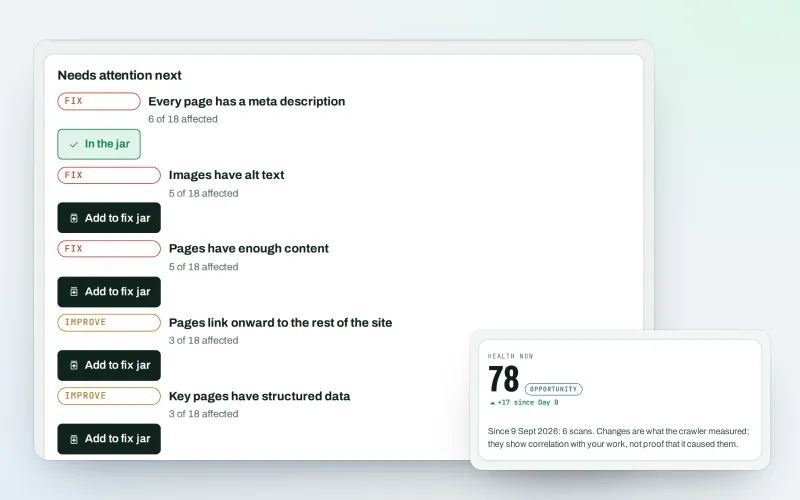
Website health check
A technical SEO audit: see what is wrong with your website, and what to fix first
Explore -
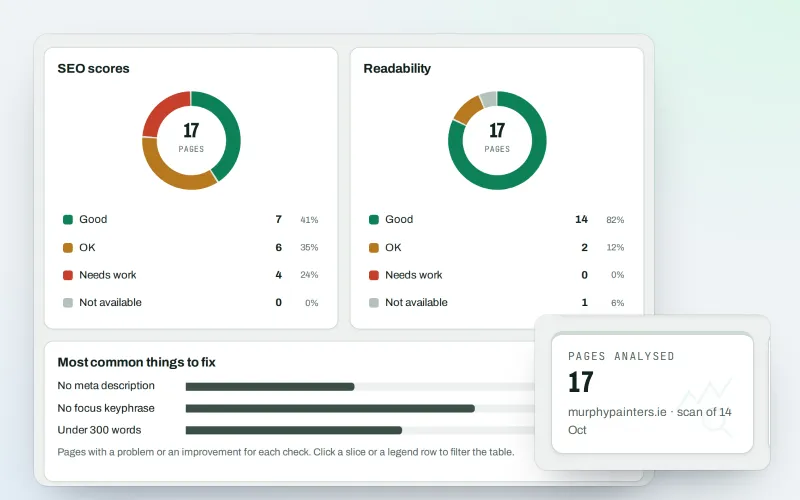
Content SEO checks
A content SEO checker for your titles, keyphrases and readability
Explore -
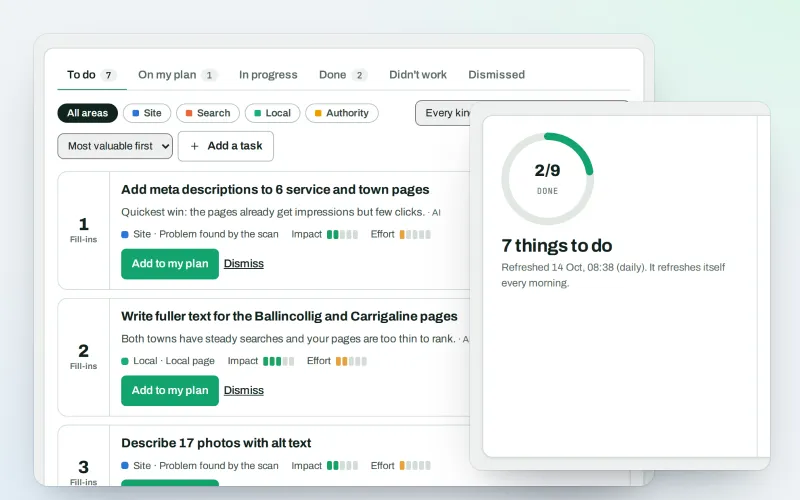
AI Plan
Your SEO action plan: the biggest difference for the least work first
Explore -
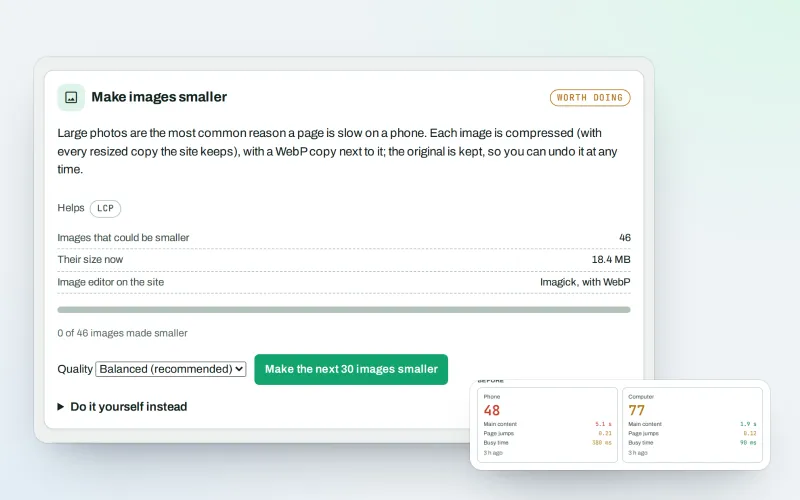
Speed fixes Beta
Website speed optimisation: find what slows your site down and fix it, safely
Explore -
Apps & plugins
The connector for your site's platform and SEOmise on your browser, computer and phone
Explore -
First wins in minutes
Your first SEO fix ready to approve and an article draft within minutes of connecting
Explore -
Fix jar and task notes
SEO task management: every fix in one jar, with a dated record of each
Explore -
Free SEO tools
Free SEO tools for everyday jobs, with no account
Explore
Try Approve and publish on your own site
Add your site; your first scan becomes your Day 0 baseline. Nothing is bought or published without your approval.
No ranking guarantees: just clear work, with the evidence.
