







- Home
- All modules
- Website health
- SEOmise for Shopify and Wix
Website health
SEOmise for Shopify and Wix Beta
A Shopify SEO app and a Wix SEO app: your website health inside your own admin
Install SEOmise from the Shopify App Store or the Wix App Market, sign in once to link your store, and see what to fix inside your Shopify admin or Wix dashboard.
Illustration of the screen, without data.
Why it matters
From the problem to what SEOmise does
Another tab to keep open
Your store lives in its own admin. Checking your website health somewhere else, then copying fixes back by hand, is easy to put off.
A Shopify SEO app and a Wix SEO app: your website health inside your own admin
- SEOmise for Shopify. A page inside your Shopify admin, publishing to your blog and online store pages, and the visit tracker as a theme app embed you switch on in the theme editor.
- SEOmise for Wix. A page in your Wix dashboard, blog posts published from SEOmise, and the visit tracker as the app's embedded script.
- Your store, your workspace. A store is linked only when you sign in and confirm it in the browser you installed from. Nobody can claim your store by typing its name.
How it works
Four steps, start to finish
- Install the appFrom the Shopify App Store or the Wix App Market, or from SEOmise (a project → Settings → Connect your website → Store apps). You approve SEOmise on your platform.
- Link your storeSign in to SEOmise (or create your account) in the same browser and choose the project. One store links to one workspace.
- See it in your adminOpen SEOmise in your Shopify admin or Wix dashboard: website health, the failing checks, open recommendations and what SEOmise can fix there.
- Approve and publishArticles and pages you approve go to your blog and pages through the app; everything else comes with the exact steps for your platform.
Features
What you get with SEOmise for Shopify and Wix
SEOmise for Shopify
A page inside your Shopify admin, publishing to your blog and online store pages, and the visit tracker as a theme app embed you switch on in the theme editor.
SEOmise for Wix
A page in your Wix dashboard, blog posts published from SEOmise, and the visit tracker as the app's embedded script.
Your store, your workspace
A store is linked only when you sign in and confirm it in the browser you installed from. Nobody can claim your store by typing its name.
Least access
The Shopify app asks for blog and page content only; orders only if you track creator sales in Influence. No customer data is asked for.
Remove it any time
Uninstall the app on your platform, or unlink it in SEOmise: SEOmise's access ends at once and its data about the store is deleted as the platform asks.
WordPress too
On WordPress, the SEOmise Connector plugin does the same and applies the fixes you approve; it is being prepared for the WordPress.org plugin directory.
Before and after
What changes with SEOmise for Shopify and Wix
Before: without the app. After: with the app. Drag the handle, or use the arrow keys, to compare.
Without the app
- Health checks in one place, the store in another
- Fixes copied by hand
- No idea what changed since the last visit
With the app
- Your summary inside your own admin
- Approved articles and pages sent for you
- Visits counted without cookies
Illustration of the difference, not a measured result.
What it needs
No surprises after you sign up
Turn a card over for the detail.
A Shopify store or a Wix site
A Shopify store or a Wix site
And permission to add apps to it (the store or site owner). The visit tracker on Wix may need a premium plan with your own domain.
A SEOmise account
A SEOmise account
An owner or admin of the workspace links the store.
Every platform
Whatever your site runs on
What SEOmise for Shopify and Wix does on each kind of website, from SEOmise's site connectors to step-by-step guidance.
WordPress
WordPress and WooCommerceWordPress sites use the SEOmise Connector plugin, which applies the fixes you approve.
Laravel
Sites built on LaravelLaravel sites use the SEOmise Laravel connector.
Any PHP site
Custom PHP, CodeIgniter, Symfony, Drupal, JoomlaOther PHP sites use the one-file PHP connector.
Every other platform
Shopify, Wix, Squarespace, Webflow, static sites and the restShopify and Wix use the apps; every other platform gets the exact steps for its own admin, checked by the next scan.
SEOmise for Shopify and Wix is in beta
It is not on sale yet, so there are no prices for it. Leave your name and e-mail address and we will tell you as soon as you can use it.
Questions about it?
Ask Mise, our assistant, in the help centre, or book a call and we will tell you where SEOmise for Shopify and Wix stands and what you can use today.
Questions
SEOmise for Shopify and Wix: common questions
What does the app cost?
Installing it costs nothing by default: SEOmise's features follow your SEOmise plan, paid in SEOmise.
What can SEOmise see in my store?
The blog and pages it publishes to, and your store's name and address. With creator sales switched on in Influence, order totals and discount codes, never customer names or addresses.
What if someone else installed it?
A store is linked to the workspace of the person who installed it and signed in. To move it, uninstall and install it again, or ask SEOmise support.
How do I remove it?
Uninstall it in your Shopify admin (Settings → Apps) or Wix (Manage apps), or press Unlink in SEOmise. Its access ends at once.
Can I use SEOmise for Shopify and Wix now?
SEOmise for Shopify and Wix is in beta: it is not on sale yet. Use Ask for early access and we will e-mail you as soon as it is ready for you. Other modules and the plans are on the pricing page.
Guides
SEOmise for Shopify and Wix: how-to guides
Works well with
Related modules
-
Publish to Shopify, Webflow and Wix Beta
Articles and local pages straight to your Shopify store, Webflow site or Wix blog
Explore -
Influence Beta
An influencer marketing platform: find credible creators and run approved collaborations
Explore -
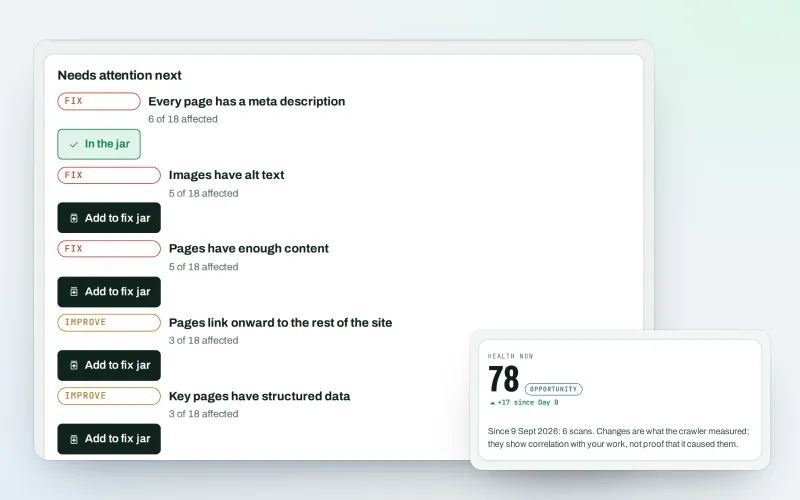
Website health check
A technical SEO audit: see what is wrong with your website, and what to fix first
Explore -
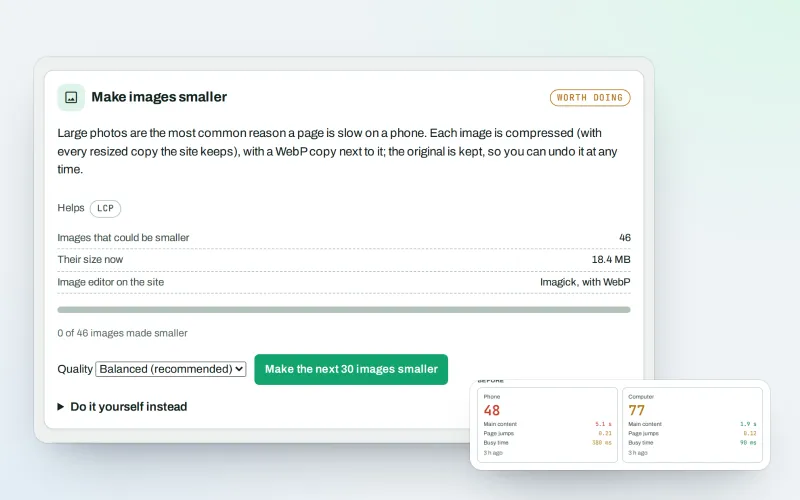
Speed fixes Beta
Website speed optimisation: find what slows your site down and fix it, safely
Explore -
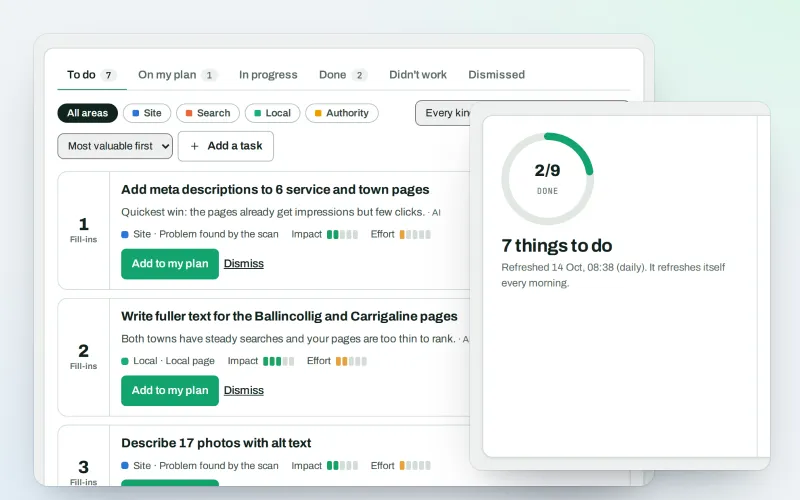
AI Plan
Your SEO action plan: the biggest difference for the least work first
Explore -
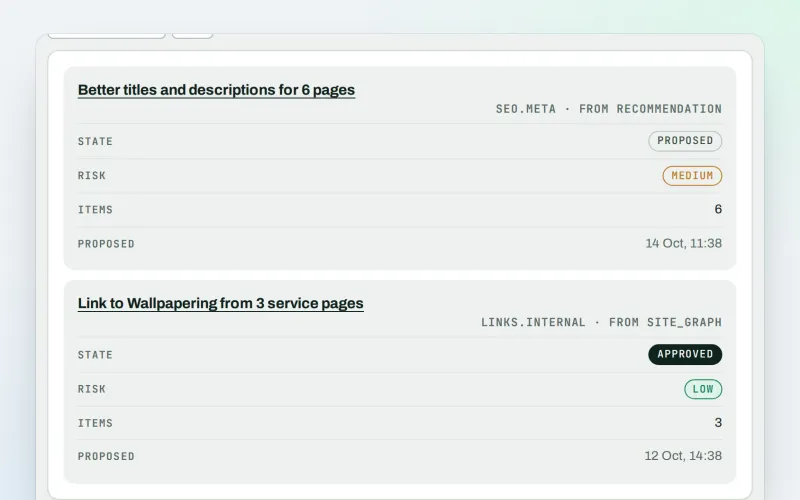
Approve and publish
Approve a fix once, and publish SEO changes that are checked and can be undone
Explore -
Apps & plugins
The connector for your site's platform and SEOmise on your browser, computer and phone
Explore -
CDN and edge Beta
A CDN checker: see how your CDN serves your website, with changes you approve
Explore
Be among the first to try SEOmise for Shopify and Wix
SEOmise for Shopify and Wix is in beta. Ask for early access and we will e-mail you when it is ready for you; nothing is bought.
No ranking guarantees: just clear work, with the evidence.
