

- Home
- All modules
- Grow
- Article autopilot
Grow
Article autopilot Beta
Articles every month for one website, researched, written in your voice and published
Choose one website and the article autopilot writes its articles every month: researched topics, your facts, links to your pages and a fact check, then your approval or automatic publishing.
Illustration of the screen, without data.
Why it matters
From the problem to what SEOmise does
The blog nobody has time to write
Search engines and AI answers reward a steady stream of useful articles, but writing, linking, checking and posting one every day or two is a job in itself. Blogs go quiet after a few weeks.
Articles every month for one website, researched, written in your voice and published
- Up to 30 a month. About one a day for one website, spread over the days and the time you choose. The articles a month are shown with what is used and what is left.
- Writing included. The included articles use no credits: the AI writing is in the price. Past them, the autopilot waits for the 1st.
- The next article on a date. The screen shows the date and time of the next article, and the articles waiting for you.
How it works
Four steps, start to finish
- Choose the websiteTools → Article autopilot → "Write for this website". The offer writes for one website of your workspace; you can move it to another at any time.
- Topics are researchedFrom the ideas you saved and the searches people make that no page of your site answers yet, most searched first, never a topic you already covered.
- Each article is writtenFrom your business facts only, in your brand voice where you set one, with links to your own pages and a check of every figure, name and contact detail.
- You approve, or it publishesEach article waits for you by default. An owner or admin can let clean articles publish on their own.
Features
What you get with Article autopilot
Up to 30 a month
About one a day for one website, spread over the days and the time you choose. The articles a month are shown with what is used and what is left.
Writing included
The included articles use no credits: the AI writing is in the price. Past them, the autopilot waits for the 1st.
The next article on a date
The screen shows the date and time of the next article, and the articles waiting for you.
Fact-checked
Anything your facts do not support is listed. An article with something to check never publishes on its own.
Linked to your pages
The first mention of each of your services and places links to its page on your site.
Your brand voice
Written by the same Articles writer you use by hand, so the voice you set for the website applies.
Published your way
Through your site connector, through Shopify, Webflow or Wix, through your site's article feed, or copied with steps for your platform.
Undo at any time
An article posted through a connector can be rolled back; one in your feed can be taken out.
Shared across clients
Agencies split the month's articles across their client workspaces, or buy it for one client with its own count, and see each client's articles this month.
Before and after
What changes with Article autopilot
Before: writing by hand. After: with the article autopilot. Drag the handle, or use the arrow keys, to compare.
Writing by hand
- A topic to find for every article
- Facts and links checked one by one
- The blog goes quiet in a busy month
With the article autopilot
- Topics chosen from real searches
- Written, linked and checked for you
- A steady article, on the days you chose
Illustration of the difference, not a measured result.
What it needs
No surprises after you sign up
Turn a card over for the detail.
Articles in your plan
Articles in your plan
The offer writes with the Articles autopilot, so it is sold with a plan that includes Articles.
Ideas or searches
Ideas or searches
Saved ideas in WonderWheel, or tracked searches in Search, give the topics.
Your business facts
Your business facts
Your Business Profile and the facts you enter are what the articles may say about you.
Every platform
Whatever your site runs on
What Article autopilot does on each kind of website, from SEOmise's site connectors to step-by-step guidance.
WordPress
WordPress and WooCommercePosted through the SEOmise connector as a draft, at once or at a set time, and rolled back if needed.
Laravel
Sites built on LaravelPosted through the Laravel connector once the site's blog is connected to it; otherwise copied with the steps.
Any PHP site
Custom PHP, CodeIgniter, Symfony, Drupal, JoomlaCopied with the steps for your site, or read by your site from its article feed.
Every other platform
Shopify, Wix, Squarespace, Webflow, static sites and the restShopify, Webflow and Wix through their apps; Framer, Lovable, Bolt, Base44, Replit and v0 through the article feed or the copy formats; any other platform with the steps and a live check.
Article autopilot is in beta
It is not on sale yet, so there are no prices for it. Leave your name and e-mail address and we will tell you as soon as you can use it.
Questions about it?
Ask Mise, our assistant, in the help centre, or book a call and we will tell you where Article autopilot stands and what you can use today.
Questions
Article autopilot: common questions
Does it publish without asking me?
Only if an owner or admin chooses that, and even then an article with anything the fact check could not find in your facts waits for a person.
What does it cost?
It is an add-on with a monthly price (under Prices on this page), with the writing of the month's articles included (no credits). Cancel any time: the autopilot stops at the end of the paid period and your articles are kept.
What happens after 30 articles?
The autopilot waits until the 1st of the next month and the screen shows the date of the next article. You can still write articles by hand in Articles, paid with credits.
Can I use it on several websites?
The offer writes for one website at a time. You can move it to another website of your workspace; the articles a month are counted for the workspace.
Where do the topics come from?
From the ideas you saved and from the searches people make that no page of your site answers yet. Topics an existing article or page already covers are skipped.
Can agencies use it for clients?
Yes. An agency adds it once for all its client workspaces and splits the month's articles across them (each client gets its share; a split larger than the agency's count is refused), or adds it for one client workspace with its own articles a month. Each client workspace chooses its own website, and articles wait for approval by default.
Can I use Article autopilot now?
Article autopilot is in beta: it is not on sale yet. Use Ask for early access and we will e-mail you as soon as it is ready for you. Other modules and the plans are on the pricing page.
Guides
Article autopilot: how-to guides
Works well with
Related modules
-
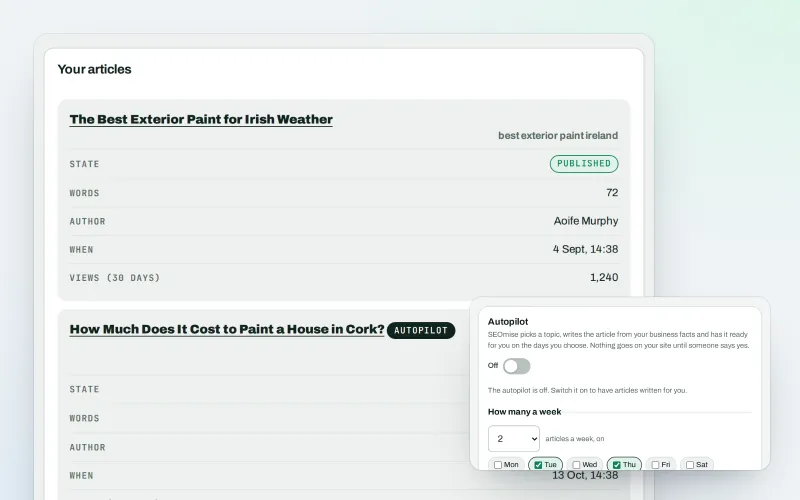
Articles
An AI blog writer that works from your own business facts
Explore -
Articles for Framer and AI site builders
Publish your articles on Framer, Lovable, Bolt, Base44, Replit and v0 sites
Explore -
Publish to Shopify, Webflow and Wix Beta
Articles and local pages straight to your Shopify store, Webflow site or Wix blog
Explore -
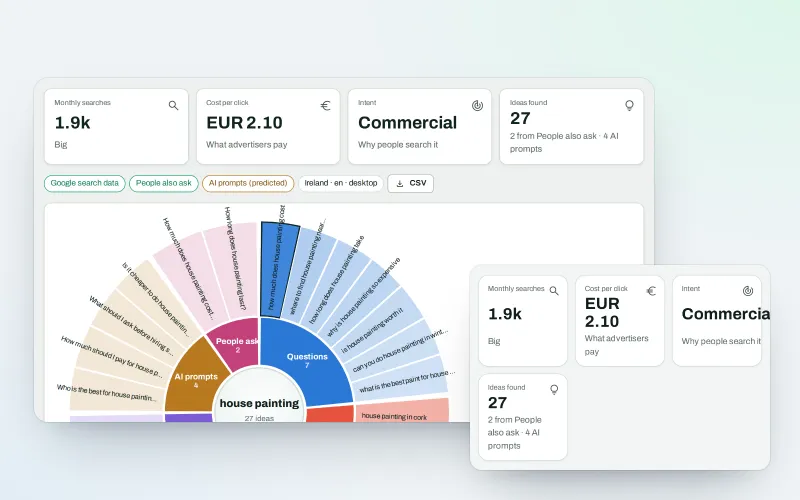
WonderWheel
A content ideas generator: spin a word and see everything people wonder about it
Explore -
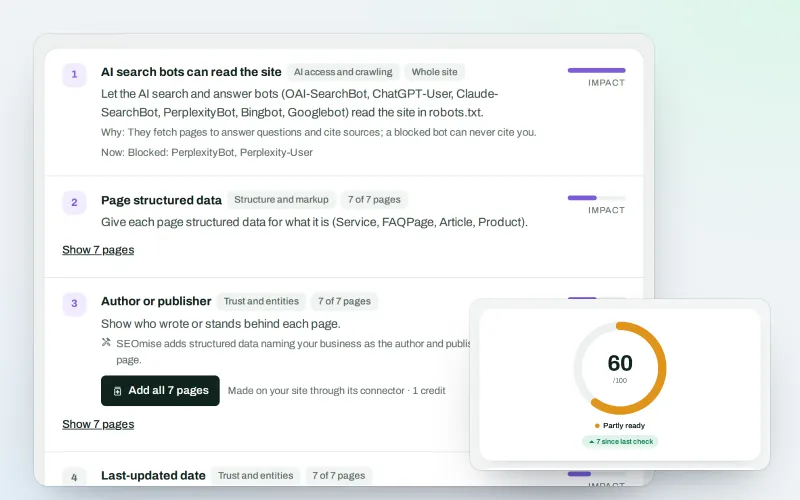
SEO Ai
AI search optimisation: check whether AI assistants can read your site and quote it
Explore -
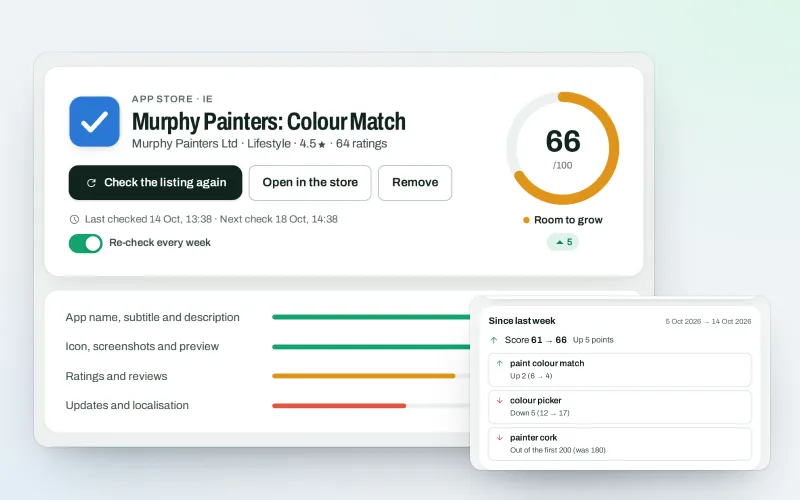
SEOApp
App store optimisation: get your app found in the App Store and Google Play
Explore -
Brand voice
A brand voice generator that studies your competitors, so every AI writer sounds like you
Explore -
Guided workspace
SEO for beginners, one mission at a time, with "Do it for me" on every step
Explore
Be among the first to try Article autopilot
Article autopilot is in beta. Ask for early access and we will e-mail you when it is ready for you; nothing is bought.
No ranking guarantees: just clear work, with the evidence.
