

- Home
- All modules
- Tools
- Search suggestions
Tools
Search suggestions Beta
Find the searches people type, from a few starting words
Expands a few starting words into the searches Google suggests as people type, with every letter and question word added, the credits shown before it runs, and one click to follow what you pick.
Illustration of the screen, without data.
Why it matters
From the problem to what SEOmise does
Not knowing how people ask
Customers type questions and long phrases you would never think of. Typing every variation into Google by hand is slow, and the ideas are lost the moment you close the tab.
Find the searches people type, from a few starting words
- Every letter and question word. Each word with a to z and with who, what, when, where, why, how, which, can, does and is.
- Credits shown before it runs. Nothing runs until you have seen the number of look-ups and the credits.
- Saved answers are free. Answers are kept for a week, so asking again is free.
How it works
Four steps, start to finish
- Type a few starting wordsSuch as the services you offer, and choose the market.
- See the cost firstHow many look-ups it makes, how many are saved from earlier (free), what your plan still covers and the credits for the rest.
- Get the suggestionsGoogle's suggestions for each word, alone and with each letter and question word added.
- Keep the good onesTick them to follow them, put them in a topic for Keyword clusters, or export them.
Features
What you get with Search suggestions
Every letter and question word
Each word with a to z and with who, what, when, where, why, how, which, can, does and is.
Credits shown before it runs
Nothing runs until you have seen the number of look-ups and the credits.
Saved answers are free
Answers are kept for a week, so asking again is free.
Follow or group
Send what you pick to your tracked searches or to Keyword clusters.
Before and after
What changes with Search suggestions
Before: typing into Google by hand. After: with Search suggestions. Drag the handle, or use the arrow keys, to compare.
Typing into Google by hand
- A few ideas, then the tab is closed
- Questions people ask never found
- Nothing saved
With Search suggestions
- Every suggestion for every starting word
- The cost known before it runs
- The good ones followed in one click
Illustration of the difference, not a measured result.
What it needs
No surprises after you sign up
Turn a card over for the detail.
Credits beyond your plan
Credits beyond your plan
Look-ups your plan does not cover spend credits, always shown first.
Search suggestions is in beta
It is not on sale yet, so there are no prices for it. Leave your name and e-mail address and we will tell you as soon as you can use it.
Questions about it?
Ask Mise, our assistant, in the help centre, or book a call and we will tell you where Search suggestions stands and what you can use today.
Questions
Search suggestions: common questions
How long does it take?
The list usually appears within a minute or two.
Do I pay again for the same words?
No. Answers are kept for a week; asking again in that time is free.
Can I use Search suggestions now?
Search suggestions is in beta: it is not on sale yet. Use Ask for early access and we will e-mail you as soon as it is ready for you. Other modules and the plans are on the pricing page.
Works well with
Related modules
-
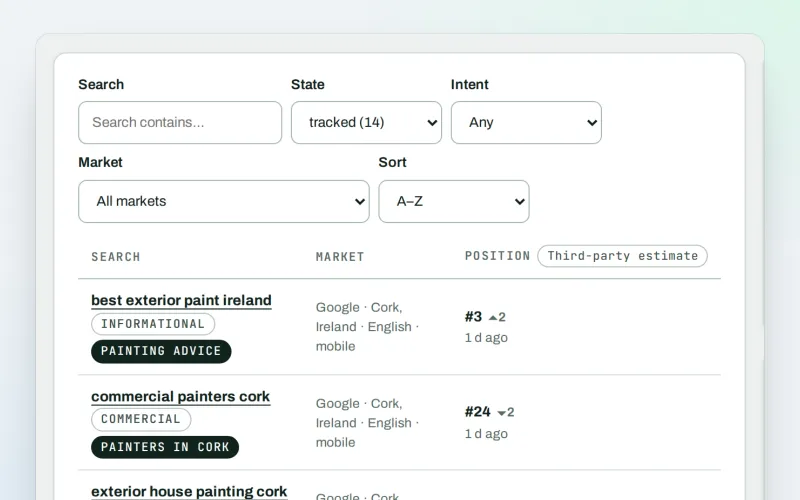
Keywords and rankings
See where you show up on Google, and which searches to go after
Explore -
Keyword clusters Beta
Turn a long list of searches into topics, with one page for each
Explore -
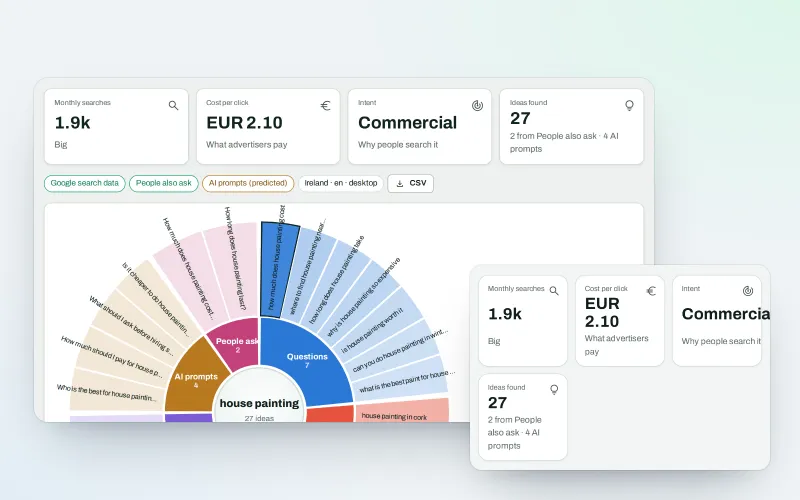
WonderWheel
Spin a word and see everything people wonder about it
Explore -
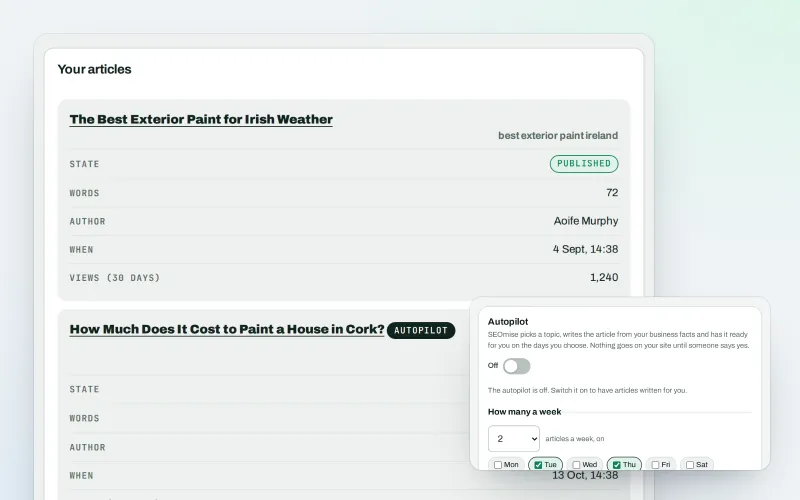
Articles
Blog articles written from your own business facts
Explore -
SEO Toolbox Beta
Every tool on its own: by the month, by the year or as a pass
Explore -
Ask about your data Beta
Ask about your SEO data in plain words, get the answer with the working
Explore -
IndexNow Beta
Get new and changed pages read by search engines sooner
Explore -
Keyword gap Beta
See the searches competitors win and you miss
Explore
Be among the first to try Search suggestions
Search suggestions is in beta. Ask for early access and we will e-mail you when it is ready for you; nothing is bought.
No ranking guarantees: just clear work, with the evidence.
