

- Home
- All modules
- Website health
- Software library
Website health
Software library
Every plugin and app you install, each site's version and one button to update them
Your software library: the connector on each of your websites and every app you install, with your version, the newest one and Update. Each site confirms the new version itself.
Illustration of the screen, without data.
Why it matters
From the problem to what SEOmise does
Which site runs which version?
With a plugin on every client site, an extension and a desktop app, keeping track of versions means opening each site one by one. Updates get missed, and "done" often means "sent", not "installed and working".
Every plugin and app you install, each site's version and one button to update them
- Everything in one place. The site connector for WordPress, Laravel and any PHP site, the Pro add-on, the store apps, the browser extension, the desktop and phone apps, and the tools you connect: each with where it lives, its version and one button.
- Every site and its version. Each site of your workspace, in every project, with the version it runs, the version it is offered, its last check-in and how it gets updates.
- Update all, or the sites you pick. One press sends the update to every site that can take it. Each site installs it, checks it still loads and puts the old version back by itself if not.
How it works
Four steps, start to finish
- Open the Software librarySettings → Software library. Each tile shows the versions your sites run and the newest one.
- Press Update allOr pick the sites you want on the item's page. A confirmation names the version first.
- Watch each siteEach row moves from queued to installing to verified, as the site itself reports the new version. A site that cannot take it keeps its old version and says why.
- The rest by handSites updated on the site itself get the exact steps for their platform, and Check again shows the version straight away.
Features
What you get with Software library
Everything in one place
The site connector for WordPress, Laravel and any PHP site, the Pro add-on, the store apps, the browser extension, the desktop and phone apps, and the tools you connect: each with where it lives, its version and one button.
Every site and its version
Each site of your workspace, in every project, with the version it runs, the version it is offered, its last check-in and how it gets updates.
Update all, or the sites you pick
One press sends the update to every site that can take it. Each site installs it, checks it still loads and puts the old version back by itself if not.
Done means confirmed
A site counts as updated only when it reports the new version itself. Sites that do not report within a day say "Not confirmed yet".
A manual path on every platform
WordPress.org copies, Laravel packages on manual updates and PHP files that cannot replace themselves get the exact steps for their platform, with a download or the commands to copy, and Check again.
Safe by design
Updates go out in measured batches with retries, only people who manage data can send them, and a version held back for a final check is never sent: its sites say why.
Before and after
What changes with Software library
Before: site by site. After: with the Software library. Drag the handle, or use the arrow keys, to compare.
Site by site
- Open each site to see its version
- "Sent" is not "installed"
- No steps for sites you update by hand
With the Software library
- Every site's version on one page
- Each site confirms the new version itself
- The steps for every platform
Illustration of the difference, not a measured result.
What it needs
No surprises after you sign up
Turn a card over for the detail.
The site connector on your sites
The site connector on your sites
The library updates the connector your sites run; downloads and the other apps are there for every plan.
Every platform
Whatever your site runs on
What Software library does on each kind of website, from SEOmise's site connectors to step-by-step guidance.
WordPress
WordPress and WooCommerceUpdated from here with SEOmise Connector Pro (with an automatic undo); the copy from WordPress.org and the free plugin alone get the steps for WordPress's Plugins screen.
Laravel
Sites built on LaravelUpdated from here when the package updates itself; set to manual updates, the row shows the artisan commands to run.
Any PHP site
Custom PHP, CodeIgniter, Symfony, Drupal, JoomlaThe PHP connector file replaces itself where the server lets it; otherwise the new file to upload, with its steps.
Every other platform
Shopify, Wix, Squarespace, Webflow, static sites and the restShopify, Wix and Webflow apps are kept current by their platforms; the browser, desktop and phone apps are listed with their version for every site.
Where Software library is included
Included in these plans. Limits, such as pages per scan or credits a month, are on the pricing page.
See pricingNot sure it fits?
Ask Mise, our assistant, in the help centre, or book a call and we will show you Software library on a site like yours.
Questions
Software library: common questions
When is an update done?
When the site reports the new version itself, at its next check-in (usually within minutes) or when you press Check again. Until then the row says "Installed: confirming".
What if the site breaks with the new version?
The connector checks that the site still loads after installing it. If not, it puts the old version back by itself and the row says "Failed: old version kept" with the reason.
Why can I not tick some sites?
They are updated on the site itself (WordPress.org's copy, the free plugin alone, a Laravel package on manual updates, a PHP file that cannot replace itself) or not connected. Their row has Steps instead.
Why is one of my sites offered the version before the newest?
New connector versions reach sites in steps: a small group first, then more, then every site, a day or more apart, so a fault shows on a few sites and is fixed before it reaches yours. For those days the library shows, and Update installs, the version that site is offered. If a new version fails on too many sites, its release stops by itself; your site keeps the version it runs.
Who can update sites?
People whose role manages data. Everyone who can open the workspace's projects can see the library.
Why does a MiseGuard row say "Paused for now"?
New versions of MiseGuard are checked before they reach sites. Your site keeps working on its version and updates once the new version is released.
Which plans include Software library?
Software library is included in the Personal, Business and Agency plans. Prices and limits are on the pricing page.
Guides
Software library: how-to guides
Works well with
Related modules
-
Apps & plugins
The SEO plugin, extensions, store apps and downloads for your platforms, in one library
Explore -
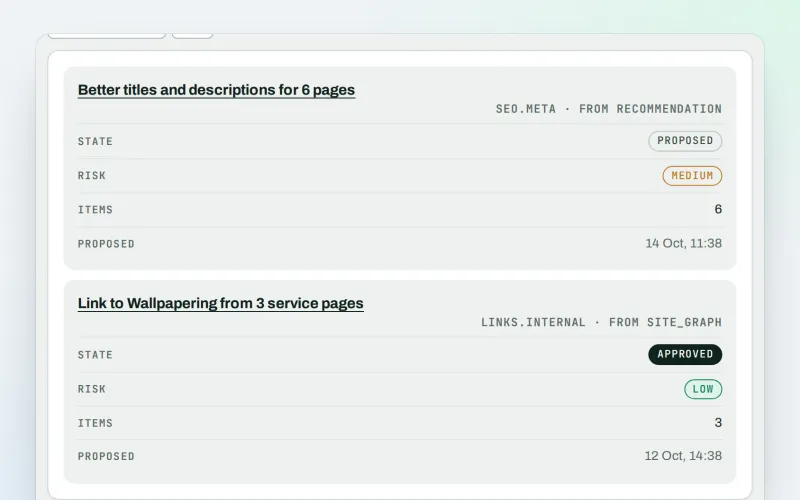
Approve and publish
Approve a fix once, and publish SEO changes that are checked and can be undone
Explore -
Publish to Shopify, Webflow and Wix Beta
Articles and local pages straight to your Shopify store, Webflow site or Wix blog
Explore -
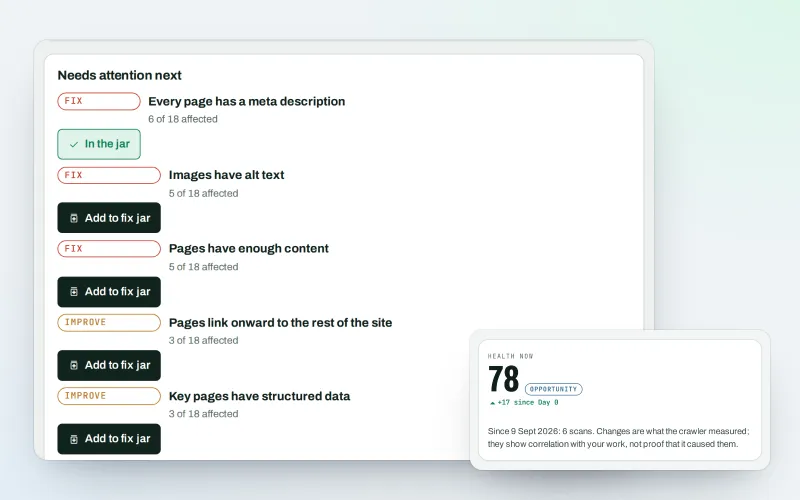
Website health check
A technical SEO audit: see what is wrong with your website, and what to fix first
Explore -
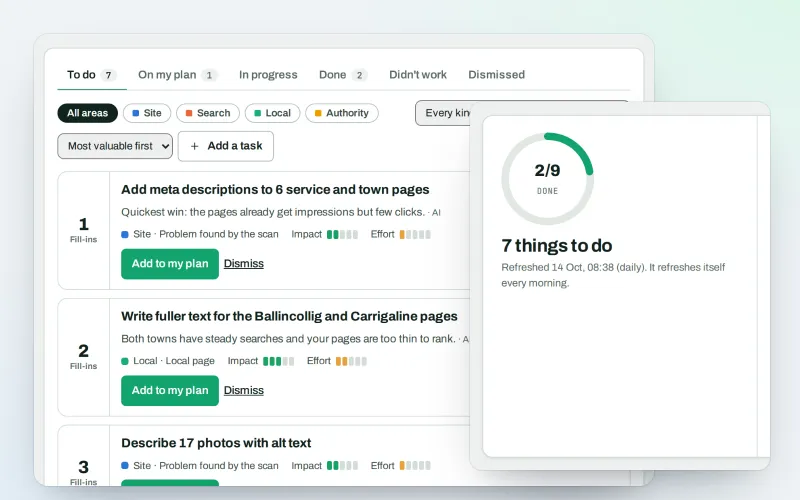
AI Plan
Your SEO action plan: the biggest difference for the least work first
Explore -
ConsentGuard SEO Beta
How your cookie banner affects search engines and measurement. A check, not legal advice
Explore -
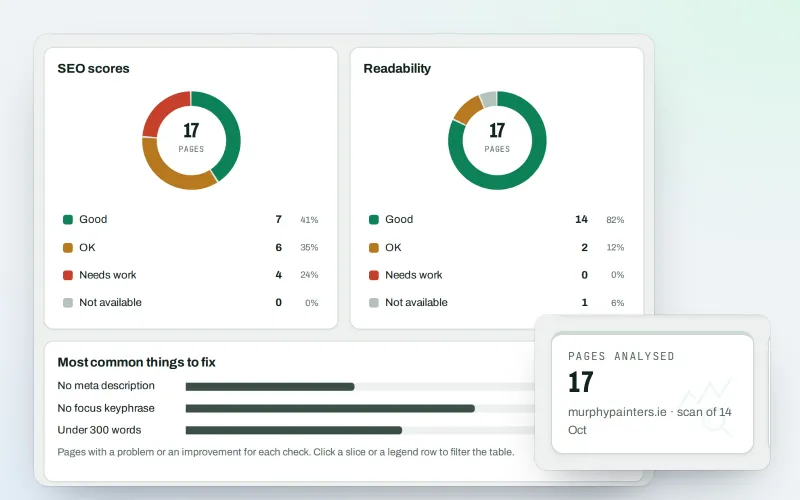
Content SEO checks
A content SEO checker for your titles, keyphrases and readability
Explore -
First wins in minutes
Your first SEO fix ready to approve and an article draft within minutes of connecting
Explore
Try Software library on your own site
Add your site; your first scan becomes your Day 0 baseline. Nothing is bought or published without your approval.
No ranking guarantees: just clear work, with the evidence.
