

- Home
- All modules
- Website health
- Accessibility check & fix
Website health
Accessibility check & fix Beta
A website accessibility checker that finds common problems and fixes them
This website accessibility checker tests every scanned page for common WCAG 2.1 AA problems, explains each in plain words, and fixes the safe ones with your approval or gives the steps.

A screen from the SEOmise demo, with sample data.
Why it matters
From the problem to what SEOmise does
People who cannot use your site
Images without a description, buttons with no name and faint text shut out people who use screen readers or find small text hard to see. With the European Accessibility Act in mind, many businesses want to know where they stand.
A website accessibility checker that finds common problems and fixes them
- An accessibility score. Every page starts at 100 and loses points for each kind of problem, more for serious ones. It measures what the checks can see, not legal compliance.
- Alt text written for you. Suggestions from file names, or from AI, for images without a description. Review them before anything is published.
- Site-wide fixes. The page language, zooming on phones, titles for embedded frames and labels for links with no text, added to every page only where missing. No page content is edited.
How it works
Four steps, start to finish
- Check the websiteSEOmise runs 18 checks on the pages of your website scan, from missing alt text to zoom blocked on phones.
- Understand each problemEach problem says why it matters, which WCAG criterion it relates to (WCAG is the international guideline for accessible websites), how serious it is and how to fix it.
- Fix the safe onesThe page language, zoom on phones, titles for embedded frames, labels for icon links and image alt text can be fixed for you after approval. The rest comes with steps.
- Keep watchAfter each scan SEOmise compares the results and e-mails the people who manage the project when new problems appear. The alerts can be switched off.
Features
What you get with Accessibility check & fix
An accessibility score
Every page starts at 100 and loses points for each kind of problem, more for serious ones. It measures what the checks can see, not legal compliance.
Alt text written for you
Suggestions from file names, or from AI, for images without a description. Review them before anything is published.
Site-wide fixes
The page language, zooming on phones, titles for embedded frames and labels for links with no text, added to every page only where missing. No page content is edited.
Colour contrast, where visible
Colours set in the page itself are compared. Colours from your theme's stylesheet files are not read, so this check covers part of the page.
A draft accessibility statement
A template statement filled with your details and the problems found, for you to check and publish. It is not legal advice.
A PDF report
Every problem with its WCAG criterion and fix, the pages with the most problems and, if you like, the statement draft.
Check a page again
After a fix, check a page straight away instead of waiting for the next scan.
Mark as done
Fixed something by hand? Mark it as done: SEOmise checks the live page where it can, and the next scan confirms it.
What it needs
No surprises after you sign up
Turn a card over for the detail.
A website scan
A website scan
The check reads the pages from the latest scan of your own website.
A connector, to fix for you
A connector, to fix for you
WordPress or Laravel, or the PHP connector for the site-wide fixes. Otherwise, follow the steps for your platform.
Your own testing too
Your own testing too
Automated checks cannot find everything. Try the site with a keyboard and a screen reader as well.
Every platform
Whatever your site runs on
What Accessibility check & fix does on each kind of website, from SEOmise's site connectors to step-by-step guidance.
WordPress
WordPress and WooCommerceSite-wide fixes and alt text for media library images through the connector, each approved first and undoable.
Laravel
Sites built on LaravelSite-wide fixes through the Laravel connector, each approved first and undoable, and alt text for images from your app's media library. SEOmise says when yours needs updating.
Any PHP site
Custom PHP, CodeIgniter, Symfony, Drupal, JoomlaSite-wide fixes from a file you upload next to seomise-connector.php, or sent to a paired PHP connector. Alt text is added by hand.
Every other platform
Shopify, Wix, Squarespace, Webflow, static sites and the restSteps for Shopify, Wix, Squarespace, Webflow and the rest, with the change to copy. Mark it as done: SEOmise checks the live page straight away where it can, and the next scan confirms it.
Accessibility check & fix is in beta
It is not on sale yet, so there are no prices for it. Leave your name and e-mail address and we will tell you as soon as you can use it.
Questions about it?
Ask Mise, our assistant, in the help centre, or book a call and we will tell you where Accessibility check & fix stands and what you can use today.
Questions
Accessibility check & fix: common questions
Does this make my website meet the European Accessibility Act?
No tool can do that on its own. SEOmise finds and fixes common problems that automated checks can see. Test with a keyboard and a screen reader too, and get expert advice where you need it.
Which problems can SEOmise fix for me?
The page language, zooming on phones, titles for embedded frames, labels for links with no text, and alt text for images in your media library. Images added by a theme or page builder get their alt text there. Other problems, such as form fields without labels or low contrast, come with clear steps to follow.
Can I undo a fix?
Yes. Fixes made through the connector can be undone from SEOmise. With the PHP connector's fixes file, delete the file to undo them.
What is the accessibility statement?
A draft you fill in and publish yourself, following the usual structure of statements in the EU. Fill the gaps in square brackets and check every sentence. It is a template, not legal advice.
How is the score worked out?
Each page starts at 100 and loses points for each kind of problem, more for critical and serious ones. The site score is the average of its pages. It is not a compliance grade.
Can I use Accessibility check & fix now?
Accessibility check & fix is in beta: it is not on sale yet. Use Ask for early access and we will e-mail you as soon as it is ready for you. Other modules and the plans are on the pricing page.
Works well with
Related modules
-
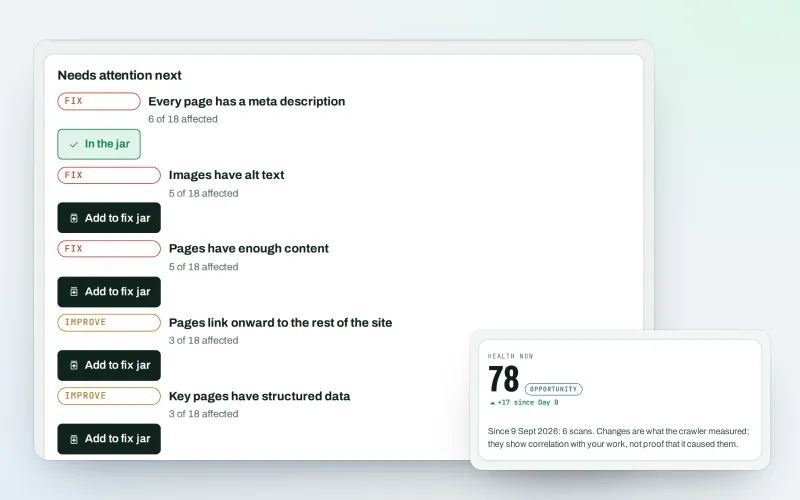
Website health check
A technical SEO audit: see what is wrong with your website, and what to fix first
Explore -
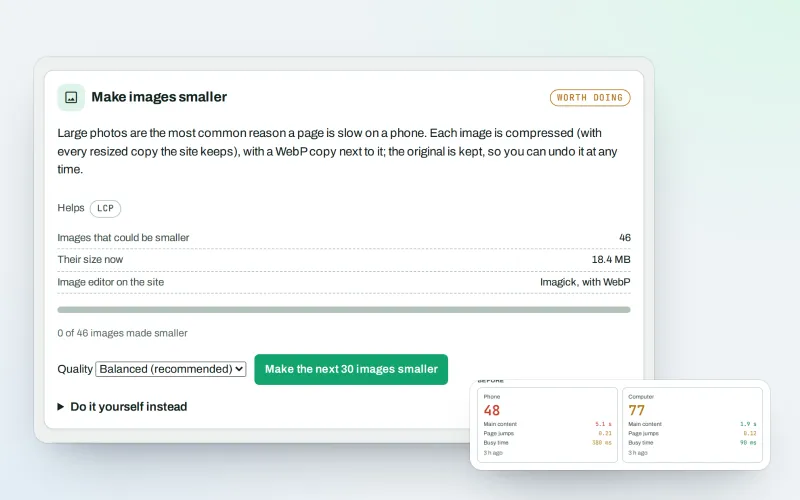
Speed fixes Beta
Website speed optimisation: find what slows your site down and fix it, safely
Explore -
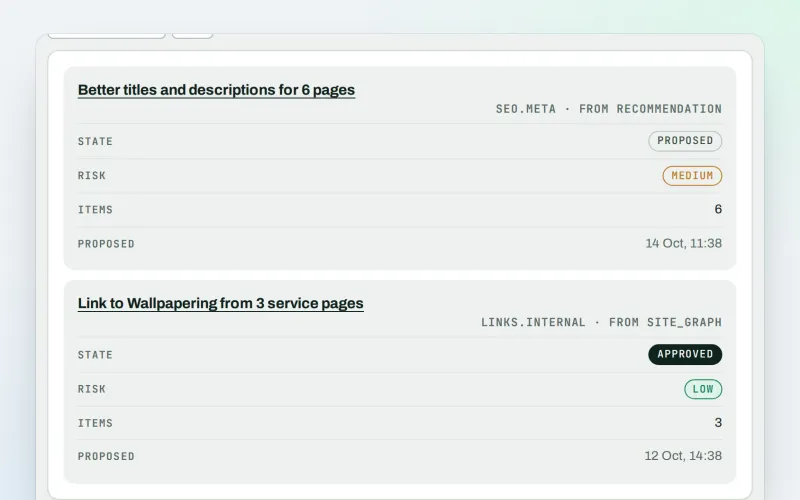
Approve and publish
Approve a fix once, and publish SEO changes that are checked and can be undone
Explore -
MiseGuard
Website protection in one place: forms, uptime, updates, firewall and backups
Explore -
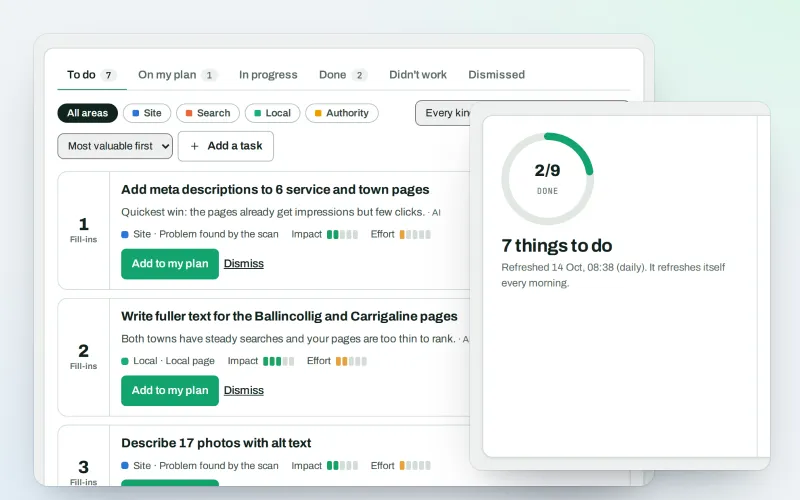
AI Plan
Your SEO action plan: the biggest difference for the least work first
Explore -
Apps & plugins
The SEO plugin, extensions, store apps and downloads for your platforms, in one library
Explore -
ConsentGuard SEO Beta
How your cookie banner affects search engines and measurement. A check, not legal advice
Explore -
Content SEO checks
A content SEO checker for your titles, keyphrases and readability
Explore
Be among the first to try Accessibility check & fix
Accessibility check & fix is in beta. Ask for early access and we will e-mail you when it is ready for you; nothing is bought.
No ranking guarantees: just clear work, with the evidence.
