

- Home
- All modules
- Website health
- What crawlers see
Website health
What crawlers see
Your page as AI crawlers read it and as Google indexes it, and how it was built
Many sites built with AI builders and JavaScript send an almost empty page. Google renders it; most AI crawlers do not. Check what crawlers see, side by side, and how to fix it for your builder.
Illustration of the screen, without data.
Why it matters
From the problem to what SEOmise does
An empty page to AI assistants
A site built in the browser looks complete to you. To a crawler that does not run JavaScript, it is a title and an empty box, so AI assistants cannot quote it and some search engines see no text.
Your page as AI crawlers read it and as Google indexes it, and how it was built
- Two columns. "Without JavaScript (AI crawlers)" beside "After JavaScript (Google)": words, title and description.
- Text only visible with JavaScript. A separate finding in the audit, weighted by how much of the text appears only after scripts ran.
- How each page is built. Server-rendered, hydrated, client-rendered only, or pre-rendered and static.
How it works
Three steps, start to finish
- Read twiceThe free audit and the site scan read your page as your server sends it, and when it looks like an app shell, again after its JavaScript ran (as our crawler, following robots.txt, never solving a challenge).
- CompareWords, title and description without and with JavaScript, the share of text only scripts add, and whether the page is server-rendered, hydrated, client-rendered only or pre-rendered.
- Fix and checkSteps for your platform or framework: pre-rendering or static generation, server-side rendering, or your host's pre-rendering. Then scan again to see the text in the HTML.
Features
What you get with What crawlers see
Two columns
"Without JavaScript (AI crawlers)" beside "After JavaScript (Google)": words, title and description.
Text only visible with JavaScript
A separate finding in the audit, weighted by how much of the text appears only after scripts ran.
How each page is built
Server-rendered, hydrated, client-rendered only, or pre-rendered and static.
Built with
The AI builder, site builder or framework, only from public markers in your page (each one cited from the tool's own source). Nothing found: "not identified". A React app is never called AI-built for being React.
Every platform
Lovable, Bolt, Base44, Replit, Next.js, Nuxt, Astro, SvelteKit, Gatsby, React with Vite, WordPress, Shopify and the rest, each with its own fix steps.
A real score for every site
When a firewall blocks our reader, the audit asks the site's own connector, then Google Lighthouse, and grades what was measured. Every check says where it came from, and "not measured" is never counted as a failure.
Safe and capped
Rendering runs only for app shells, within a budget per scan and per hour, with every request the page makes checked first.
Before and after
What changes with What crawlers see
Before: graded as sent. After: with What crawlers see. Drag the handle, or use the arrow keys, to compare.
Graded as sent
- An F for "no text" on a site full of text
- No idea what AI assistants see
- Generic advice
With What crawlers see
- Graded on what Google indexes after rendering
- The AI-crawler view shown and scored on its own
- Fix steps for your builder or framework
Illustration of the difference, not a measured result.
What it needs
No surprises after you sign up
Turn a card over for the detail.
JavaScript rendering
JavaScript rendering
The "after JavaScript" column needs JavaScript rendering; without it the panel shows the page as sent and says it was not rendered.
Every platform
Whatever your site runs on
What What crawlers see does on each kind of website, from SEOmise's site connectors to step-by-step guidance.
WordPress
WordPress and WooCommerceWorks on any public website, whatever it is built on.
Laravel
Sites built on LaravelWorks on any public website, whatever it is built on.
Any PHP site
Custom PHP, CodeIgniter, Symfony, Drupal, JoomlaWorks on any public website, whatever it is built on.
Every other platform
Shopify, Wix, Squarespace, Webflow, static sites and the restAI builders, React, Vue, Next.js, Nuxt, Astro, SvelteKit, Shopify, Wix, Webflow and every other platform: nothing to install. The fix is a change to how the site builds its pages, with steps for each.
Where What crawlers see is included
What crawlers see is not part of a public plan at the moment.
See pricingNot sure it fits?
Ask Mise, our assistant, in the help centre, or book a call and we will show you What crawlers see on a site like yours.
Questions
What crawlers see: common questions
Do AI assistants run JavaScript?
Mostly not: their crawlers read the HTML your server sends. Google renders pages, so the grade uses the rendered page, and the AI-crawler view is a separate finding.
How do you know my site was built with Lovable or Next.js?
Only from markers in the page itself, such as a builder's publishing address, a framework's page data or a generator tag, each taken from the tool's own public source. If nothing matches we say "not identified".
What is the fix?
Put the text in the HTML the server sends: pre-render or statically generate your public pages, render them on the server, or use your host's pre-rendering. Then scan again to check.
Which plans include What crawlers see?
Plans and add-ons are on the pricing page. If What crawlers see is not listed there yet, ask us how to get it.
Works well with
Related modules
-
JavaScript rendering Beta
JavaScript SEO: scan sites built with React, Vue and similar as visitors see them
Explore -
Free site audit (key pages)
A free website audit of the key pages of any site, without an account
Explore -
SEO Ai
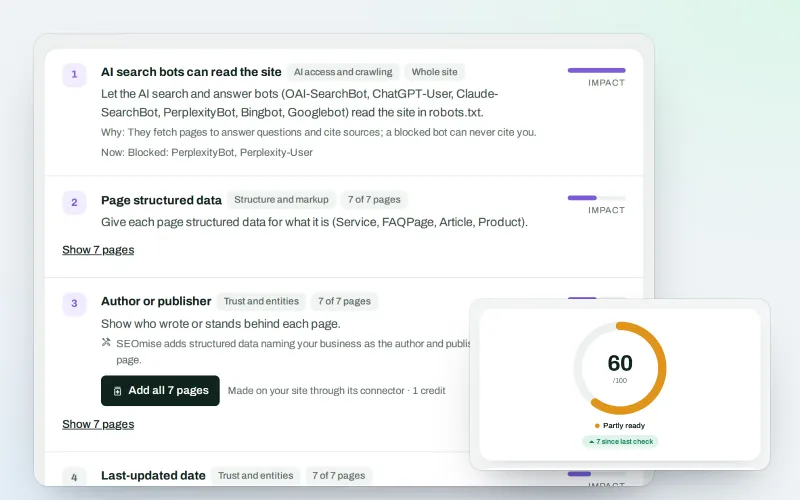
AI search optimisation: check whether AI assistants can read your site and quote it
Explore -
Website health check
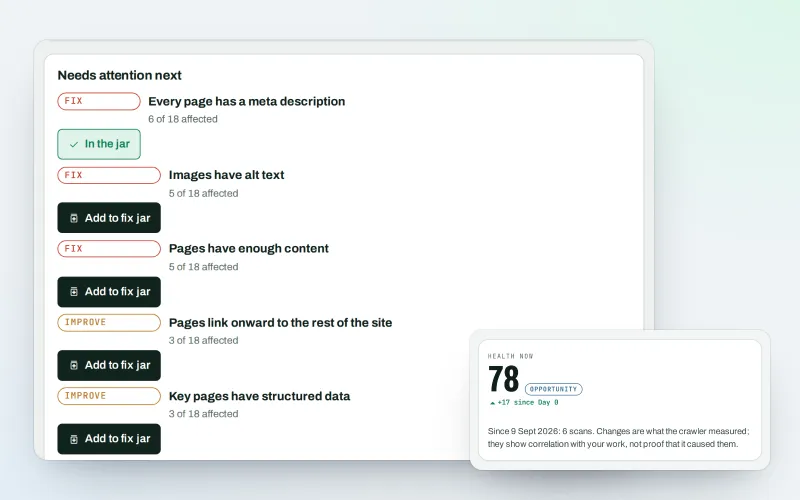
A technical SEO audit: see what is wrong with your website, and what to fix first
Explore -
AI Plan
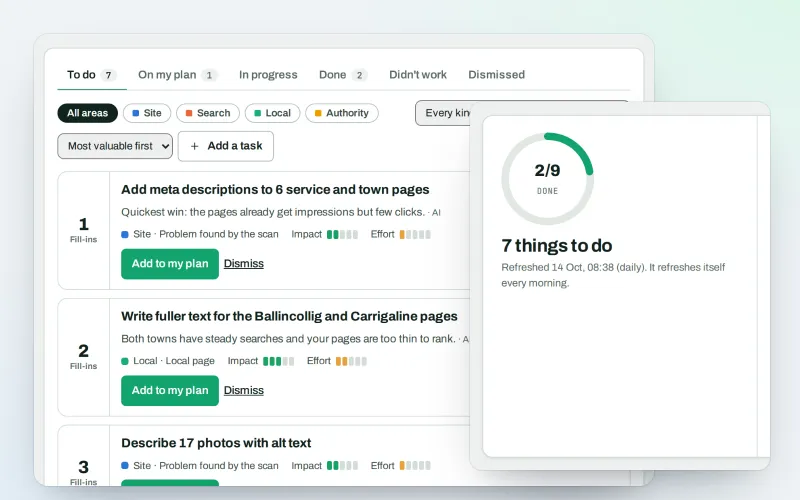
Your SEO action plan: the biggest difference for the least work first
Explore -
Approve and publish
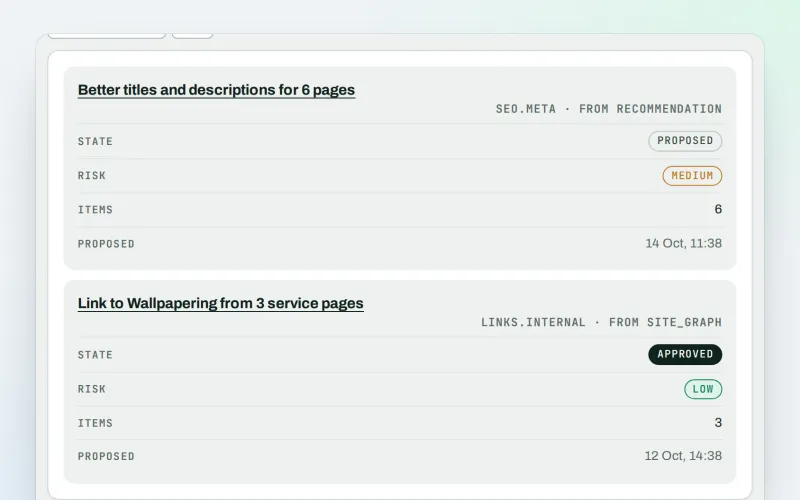
Approve a fix once, and publish SEO changes that are checked and can be undone
Explore -
Apps & plugins
The SEO plugin, extensions, store apps and downloads for your platforms, in one library
Explore -
ConsentGuard SEO Beta
How your cookie banner affects search engines and measurement. A check, not legal advice
Explore
Try What crawlers see on your own site
Add your site; your first scan becomes your Day 0 baseline. Nothing is bought or published without your approval.
No ranking guarantees: just clear work, with the evidence.
