

- Home
- All modules
- Visitors & reports
- Reports centre
Visitors & reports
Reports centre
An SEO reporting tool: every report in one gallery, as a branded PDF or a link
An SEO reporting tool with one Reports page per project: categories, a search and a gallery. Choose the period, then download a PDF, CSV or Excel file, or send your client a private link.
Illustration of the screen, without data.
Why it matters
From the problem to what SEOmise does
Every report lived on a different screen
Website health, rankings, backlinks, traffic, client reports and business figures each had their own page, their own period picker and their own export. Finding the right one, and sending it in the right format, took longer than reading it.
An SEO reporting tool: every report in one gallery, as a branded PDF or a link
- Results against the period before. An executive summary, rankings and movers, backlinks gained and lost, a health trend, Business Profile, map grid, content, AI answers, competitors, and leads and conversions, each against the period before.
- Branded, with lines, bars and pies. Every report opens with a letterhead cover and shows its figures as tiles and charts: where your searches rank, how people found your Business Profile and your kinds of links as pies, scores by area as bars, every trend as a line, with the figures under each chart and page numbers in the PDF.
- A client view online. Your client reads the report in the browser without an account: the brand, Download PDF and a contents list. Each link has an end date, can ask for a password, keeps a view log and can be revoked.
How it works
Four steps, start to finish
- Pick a reportEvery report as a card in one gallery, with the categories on the left and a search. You only see the reports your role and plan allow.
- See what it holdsEach card shows a picture of the report's main chart, what it shows, what it reports on and which files it makes.
- Choose the criteriaThe project or projects, the period with a comparison, the sections and their order, the brand and the time zone.
- Download or send to your clientPDF, CSV or Excel. Or a private link your client opens in the browser, with the PDF to download, an end date and an optional password, which you can switch off at any time.
Features
What you get with Reports centre
Results against the period before
An executive summary, rankings and movers, backlinks gained and lost, a health trend, Business Profile, map grid, content, AI answers, competitors, and leads and conversions, each against the period before.
Branded, with lines, bars and pies
Every report opens with a letterhead cover and shows its figures as tiles and charts: where your searches rank, how people found your Business Profile and your kinds of links as pies, scores by area as bars, every trend as a line, with the figures under each chart and page numbers in the PDF.
A client view online
Your client reads the report in the browser without an account: the brand, Download PDF and a contents list. Each link has an end date, can ask for a password, keeps a view log and can be revoked.
Positions, competitors and leads
Reports about a project add a position tracker (Day 0, now, best and the change), the competitors who rank for your searches, the Business Profile's calls and enquiries counted from your forms.
Any period
Last 7, 28 or 30 days, this or last month, a quarter, the year so far, the last 12 months, since the work started or since Day 0, or your own dates. Business reports compare with the period before or the same period a year earlier.
PDF, CSV and Excel
Excel files have a summary sheet and one sheet per table. Spreadsheet cells are protected against formulas.
Your brand
With white label, reports and their links carry your brand and never name SEOmise.
A library
Every report made is kept with its fingerprint, so you can download it again, share it, or make a new version for another period.
Personal data left out
Reports with names or e-mails leave them out unless you choose otherwise, and so do links.
Templates, covers and sign-off
Start from a ready-made template (SEO, rankings, links, site audit, PageSpeed, Search Console, Google Analytics 4, AI, Business Profile, map grid, content, leads and the client pack), each with what it needs and a sample. Save a report's sections in their order, its brand and its own cover (title, prepared for, an introduction) as a template for yourself or the team, copy one, or keep one as your master: every client's copy follows its changes. Have a colleague sign a report off before it is shared or sent; a signed report says who signed it and when.
Schedules
Any report is made on its own every week, or every month on a date or a weekday such as the first Monday, in your time zone, and e-mailed to your team, your client contacts and others who confirmed, with the PDF as it was sent. Each period goes out once.
Your whole portfolio
Agencies see every client at a glance, the clients that need attention and why, results by client group and the month's work, and can show a finished report in the client portal, where the client reads and downloads it.
Report templates
Start from a ready-made template
SEO, rankings, links, local, analytics, AI and leads: each template shows what it includes, the data it needs and a sample on demo data.
Before and after
What changes with Reports centre
Before: before. After: with the Reports centre. Drag the handle, or use the arrow keys, to compare.
Before
- A different screen for each report
- PDF on some screens, CSV on others
- No way to share most reports
With the Reports centre
- One place with every report you may make
- The same choices and files for each report
- Private links with an end date for every report
Illustration of the difference, not a measured result.
What it needs
No surprises after you sign up
Turn a card over for the detail.
Data SEOmise already has
Data SEOmise already has
Reports read what SEOmise has already measured. Making a report never buys data; a project that has not been scanned says so and offers the scan.
The right role
The right role
Reading reports needs access to the project; making, downloading and sharing them needs the "Export reports" permission.
Nothing on your website
Nothing on your website
No connector is needed to make reports.
Every platform
Whatever your site runs on
What Reports centre does on each kind of website, from SEOmise's site connectors to step-by-step guidance.
WordPress
WordPress and WooCommerceWorks the same on every site: reports are built from what SEOmise measures.
Laravel
Sites built on LaravelWorks the same on every site: reports are built from what SEOmise measures.
Any PHP site
Custom PHP, CodeIgniter, Symfony, Drupal, JoomlaWorks the same on every site: reports are built from what SEOmise measures.
Every other platform
Shopify, Wix, Squarespace, Webflow, static sites and the restNothing to install. Sites on any platform, such as Shopify or Wix, get the same reports.
Where Reports centre is included
Included in these plans. Limits, such as pages per scan or credits a month, are on the pricing page.
See pricingNot sure it fits?
Ask Mise, our assistant, in the help centre, or book a call and we will show you Reports centre on a site like yours.
Questions
Reports centre: common questions
Do the old report screens go away?
No. Every report screen you know keeps working and has an "Open in Reports" button.
Does making a report cost credits?
No. Reports use data SEOmise already has, so making one never buys data or uses credits.
Is there one report with everything for my client?
Yes: the Monthly client pack. It starts on last month with an executive page, then rankings, content, backlinks, health, Business Profile, map grid, leads and AI answers, and ends with the work done and next steps. A part your plan does not include is left out and the pack says so.
What if a source is not connected?
The report says which connection or check is missing, for example "Google Analytics is not connected". A figure that was not measured is never shown as 0.
Can a link show newer data later?
No. A share link shows the report as it was made. Make a new version for a new period and share that one.
Can my client see reports without an account?
Yes, through a share link. Agency clients with a portal account also find the reports you chose to show there.
Can I put my own brand on reports?
Yes, with the white-label add-on and your brand set up under Agency, Branding. The report and its link page then never name SEOmise.
Can reports go out on their own?
Yes. Make any report on a schedule and it is made and e-mailed weekly, monthly or quarterly, on a date or a weekday, in your workspace's time zone. If it needs sign-off, it waits until it is signed off. Each period is sent once, and the PDF is kept as it was sent.
Can I send reports to clients who have no account?
Yes. Your client groups' contacts can receive them, and any other address once it confirms by a link we e-mail it. Every e-mail has a link to stop the report.
Do partners get reports too?
Yes. Regional partners, resellers, agency partners and affiliates have reports of their clients and usage, revenue share and commission, payouts, and leads in their partner console, to download or send on a schedule.
Who can sign off a report?
Owners, admins and approvers, or one person you name. Your workspace can ask for sign-off on every report before it is shared or sent.
Which plans include Reports centre?
Reports centre is included in the Free, Personal, Business and Agency plans. Prices and limits are on the pricing page.
Works well with
Related modules
-
Client reports
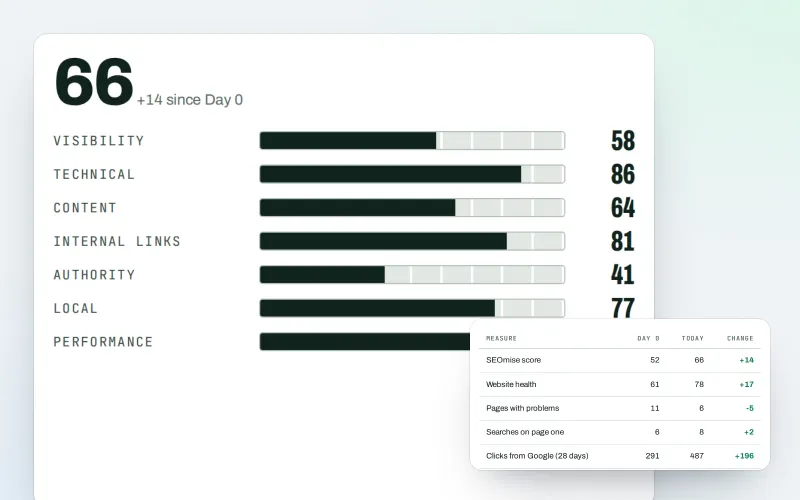
White label SEO reports as a PDF, e-mailed every week or month
Explore -
SEO audit reports
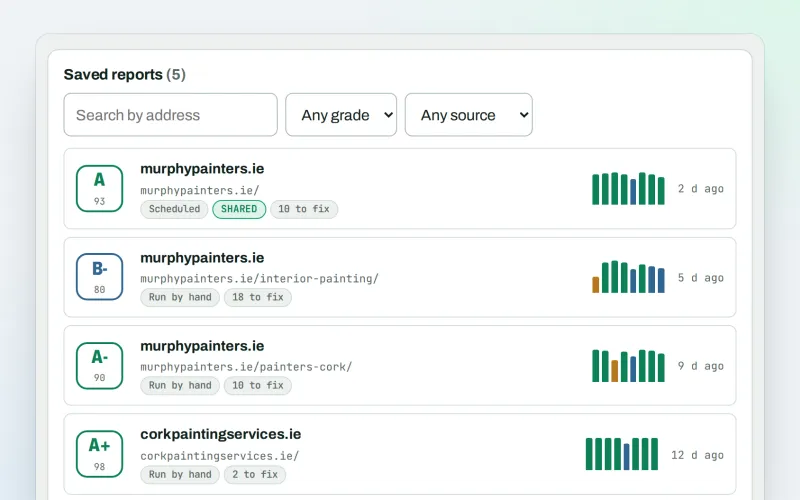
A graded SEO audit of any web address, ready to share or send
Explore -
Live client report links
Live SEO reports: send clients one private link that is always up to date
Explore -
Proof of Progress
An SEO progress report: show a client what changed since the work started
Explore -
Client update e-mails
Client SEO updates by e-mail: rankings up, rankings down and the work done
Explore -
Google data
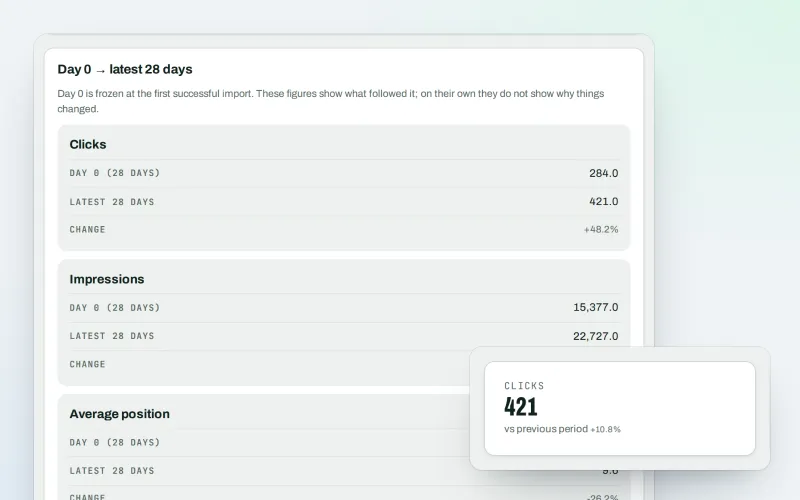
A Search Console dashboard with your Analytics figures, imported every day
Explore -
Live view
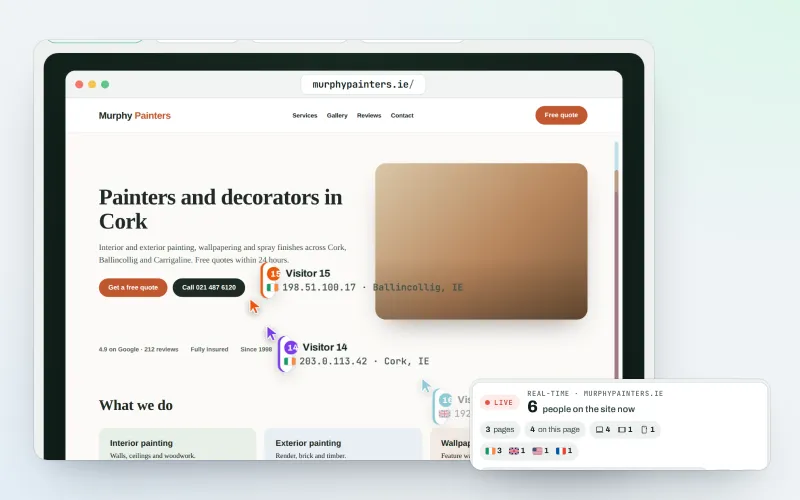
See real-time website visitors, right now, and where they click
Explore -
Report archive
Your SEO report archive: every report kept exactly as sent, with who it went to
Explore
Try Reports centre on your own site
Add your site; your first scan becomes your Day 0 baseline. Nothing is bought or published without your approval.
No ranking guarantees: just clear work, with the evidence.
